To make a field private, simply change the public on a field definition to private. Since we only want the Employee to be controlling their HoursWorked let's make that field private.
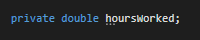 Note: When making fields private it is also necessary to change the first upper case letter to lower case.
So now in the MainWindow where we are assigning the attendant's hoursWorked it is throwing an error because the MainWindow shouldn't be able to do anything to a field the Employee should handle themselves.
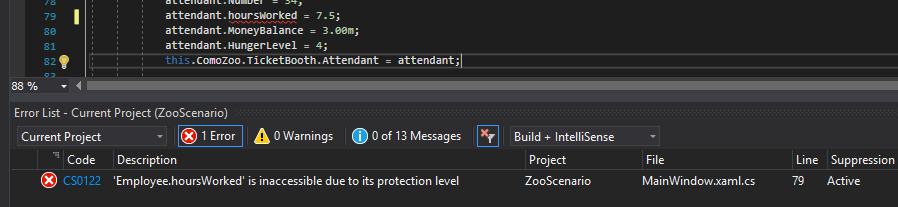 Note: We will go over different ways to solve this error in future articles.
Let's make the Employee's Weight field private as well.
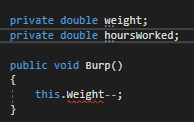
Notice that when we do this, a reference to the Weight field in the Burp method throws an error. This is because the application is looking for a field with a capital letter but not finding one.
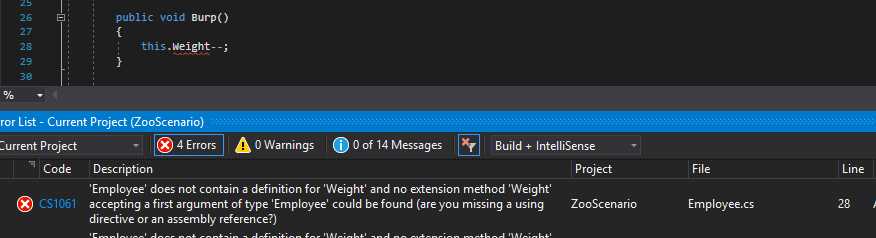
We can fix this error by changing the reference from an upper case to a lower case.
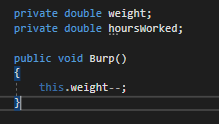
Because the Burp method is in the same class as the private weight field it can access it directly.
Anything public in class/sequence diagrams has been represented with a + sign. Private fields, however, are represented using a - sign.
Let's take a look at the changes made so far:
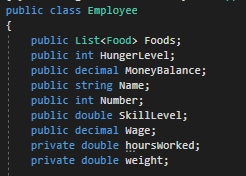
To represent this in a class diagram would look like this:
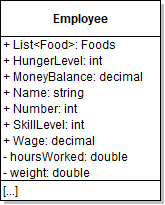
Notice how the casing is now lower case, the + is now a -, and the fields have shifted below the public fields.