Setter properties allow us to assign values to private fields from outside of the class they are defined. The setter value will always be what you are trying to assign the private field to.
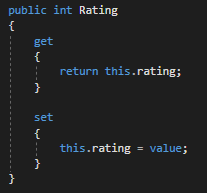
For this example we will be looking at the code below.
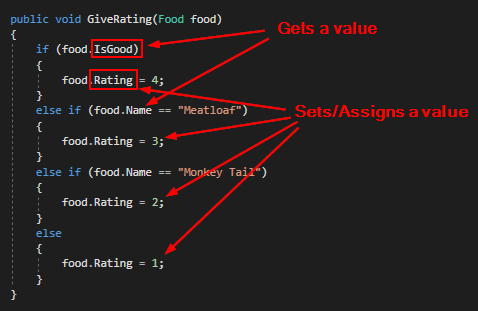
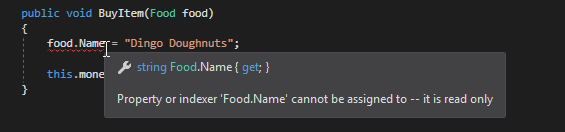
We can tell that a property has a setter and IS assigning a value because of the = operator. If, however, the property does not have a setter, an error will occur. For instance, the Food class has a Name property that only gets the private name field's value because we should not be able to assign the value to something else.
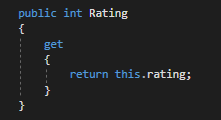
So let's say that the Rating property only has a getter, but we want to be able to assign the private rating field from the Employee class.
We can do this by adding a setter to the property below the getter.
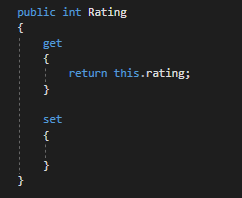
We aren't finished, however. We need to write a line of code that says we want to assign the private rating field to the value we assigned the property to. Just like getters, it is incredibly important that you reference the private field using lowercase. If you use uppercase in the property it will cause the property to continually reference itself and will cause a recursion error.
So when we run the application we can see that the private rating field is 0 and the value "passed into" the property is 4.
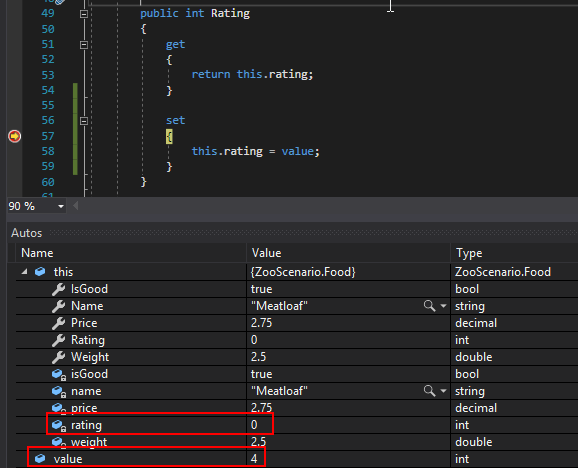
Once we step over the assignment we can see that the private rating value is assigned to the value.