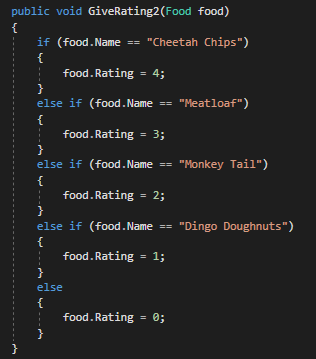
Switch statements allow you to control the flow of your program based on several different cases. Switch statements are if/else if conditional statements with different syntax. It takes a particular value and then tests that value against different conditions. When that condition evaluates true the switch statement breaks out. If the conditional evaluates false the next case is tested until the end is reached.
For this example we will be looking at this block of code:
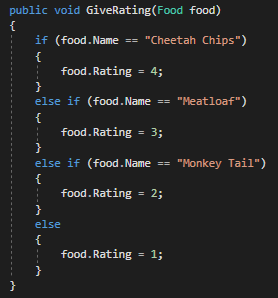
While there isn't anything wrong with this code, it can be changed into a switch statement to make it more readable. The first thing we are going to do is define the value the switch statement will be dealing with. This is known as switching on something. In this example we are switching on the food object's Name property.
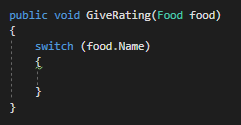
Then we are going to define our first case statement. A case statement is the English equivalent of saying, "If this thing is the same as the thing in the switch, then do something". In our case, we want to check the name of the food item. Every case statement needs a break statement in after it as well to indicate that it is finished.
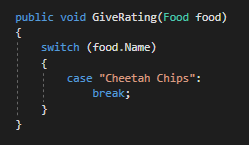
This is the same as:
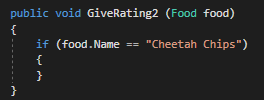
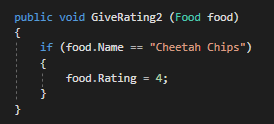
Notice that in the two diagrams nothing is happening when the condition is true. We need the code to actually do something so we will assign the food object's Rating.
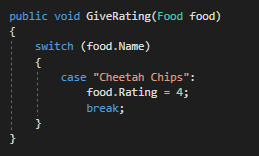
This is the same as:
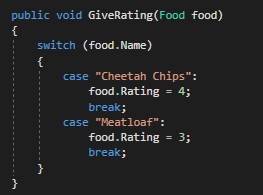
Now we can add an additional case statement that checks another condition.
This is the same as:
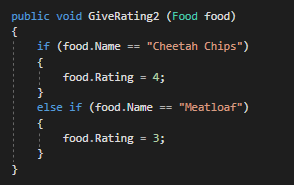
We can add as many case statements as we like.
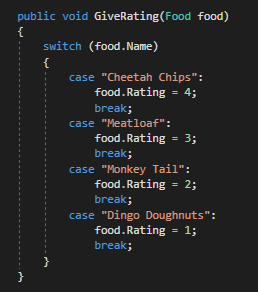
However, if none of the cases evaluate to true we need to do something. To handle this scenario we will add a default case that will happen if every one of the cases is false.
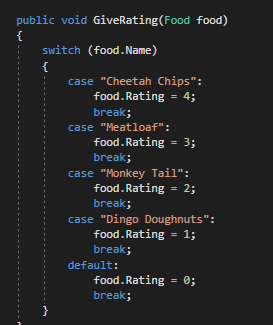
This is the same as: