To define a constructor, always use public visibility, the class name, parenthesis, and curly braces to hold the constructor body. Constructors will always go below any fields in a class.
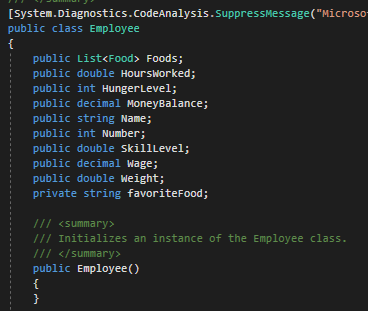
Constructors are something we have been doing since week 1, but have not really known we were doing. Every time we create a new object we are calling a constructor. Before now, however, the call to the constructor has been implicit meaning that the class handles it without us needing to give it any information.

Now, though, we can define our own explicit constructors and put information in them so that whenever an object is instantiated of that type something will happen every time.
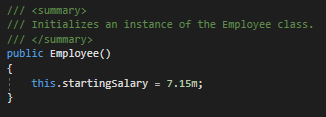
For example, let's say we want every new Employee to have the same startingSalary field value. To do this we can assign the field inside the constructor like this:
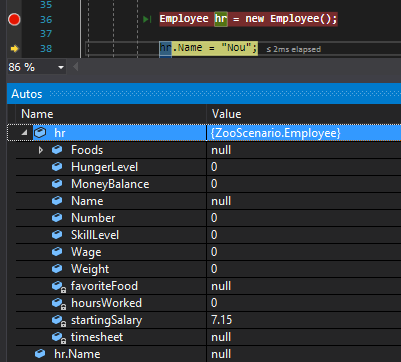
Now if we press F10 on the line that instantiates a new Employee in the MainWindow, notice that all of the other Employee fields are null/0 except for the startingSalary because it is assigned in the constructor when the object is instantiated.
We will be covering other ways to use constructors in future articles, but for now understand that constructors are executed whenever a new object is instantiated and we can explicitly change how a constructor acts when we define it within a class.
Constructors are also used to ensure that the class handles assigning fields not the MainWindow or some other class. Assigning fields from the MainWindow or another class "breaks" encapsulation.
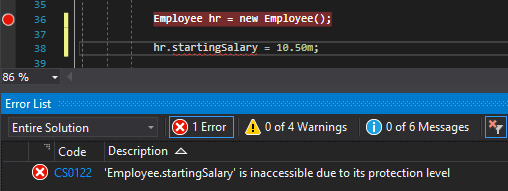
For instance, our example above assigns the private startingSalary field. Note that we cannot assign the startingSalary from the MainWindow.
But if we use the constructor we can instantiate the object in the MainWindow but keep the assigning of the field in the Employee class.