2.7.16 Representing Property Access in Sequence Diagrams

Representing Property Access in Sequence Diagrams

Property syntax looks like field access at the call site, but a property getter or setter executes accessor code on the receiver.

Read the Code Before Drawing

Inside a Controller method, selected refers to an existing Player with the JerseyNumber property defined in the linked lesson. Initially its backing field is 1.

If the underlying C# feature is unfamiliar, use the lesson below while reading this example.

Source to translate
selected.JerseyNumber = 7;
int displayedNumber = selected.JerseyNumber;
Rewrite the Meaning in Ordinary Words
Pseudocode for the same behavior
The controller writes 7 through the player's JerseyNumber setter
The setter stores 7 in the backing field
After that completes, the controller invokes the getter
The getter returns 7
The caller stores it in displayedNumber

Use these words to follow one execution before drawing it. Keep the same order and the same alternatives as the source; simplify the wording without adding work that the code does not perform.

Map the Source to Lifelines and Messages
Build the Diagram in Violet
  1. Create lifelines controller : Controller and selected : Player in a Violet sequence diagram.
  2. Send set JerseyNumber(7) from controller to selected and show the setter activation ending before the next request. Its completion carries no value.
  3. Below that exchange, send get JerseyNumber() from controller to selected. Show its activation and a dashed result 7 back to the caller.
  4. Add a caller note Store 7 in displayedNumber. Explain that the accessor labels represent property syntax, not literal C# method names the student must type.
  5. Save and follow the two exchanges in order. Both operate on the same existing Player; neither creates another one.
Compare the Completed Soccer Diagram

Compare this reference with the diagram you built in Violet. Layout may differ; the source meaning, labels, and relevant connections should agree.
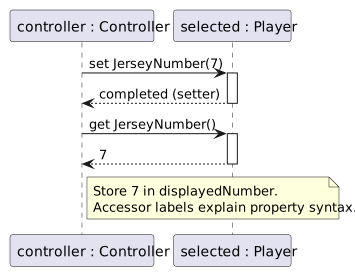
Controller sets JerseyNumber to 7, then reads it through the getter and receives 7.
A setter followed by a getter on the same player
  • New
  • Changed
  • Removed
Trace One Interaction from Top to Bottom

Both arrows target selected. The setter changes the backing field; the getter reads the updated value. No new Player is created by either access.

Verify the Drawing Against the Source
Predict and Check a Small Change