Use using System.Collections.Generic; at the top of the C# file, before its class definitions. Place the following statements inside an existing method. These examples use the established Player class and its public integer field NumberOfTurns.
List<Player> missingPlayers = null;
List<Player> emptyPlayers = new List<Player>();
List<Player> players = new List<Player>();
players.Add(null);| State | List exists? | Count | Can read a Player field? |
|---|---|---|---|
| missingPlayers | No | Cannot read Count | No |
| emptyPlayers | Yes | 0 | No item at index 0 |
| players | Yes | 1 | Index 0 contains null |
Creating a list does not create Players. Adding null creates a current entry without creating a Player. Count includes that entry. These examples use the course’s Player reference model; a project with nullable reference analysis enabled may also warn about null assignments.
Player jordan = new Player();
jordan.NumberOfTurns = 2;
players.Add(jordan);
int occupiedEntries = 0;

foreach (Player current in players)
{

    if (current != null)
    {
        current.NumberOfTurns = current.NumberOfTurns + 1;
        occupiedEntries = occupiedEntries + 1;
    }
}
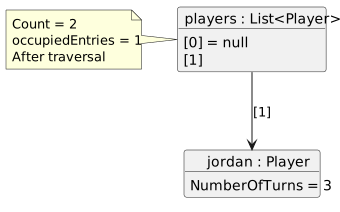
Continue with players from the first example. The first pass receives null and skips the body of the if. The second receives Jordan and increases the turn count from 2 to 3. occupiedEntries is 1 even though Count is 2.
- New
- Changed
- Removed
int availableEntries = 0;

if (missingPlayers != null)
{
    availableEntries = missingPlayers.Count;
}
The null test protects access to the list itself. It does not prove that every entry reaches a Player. A separate item check protects a Player field read.