- New
- Changed
- Removed
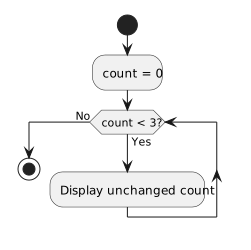
The condition remains true because count stays 0. The display repeats the same value. A correction is to increase count in the body; another is to change the condition when work completes. Adding an unrelated counter does not help unless the loop tests it.
A loop that repeats forever can also result from an update moving in the wrong direction. For example, decreasing count from zero while the condition is count < 3 keeps the condition true. Check not only whether the variable changes, but whether its changes can reach the stopping boundary. Pause the debugger once the pattern is established.
Use a breakpoint in the loop, inspect count for two or three passes, and stop debugging once the repeated state is clear. Explain which statement needs to change the state tested by the condition.