2.1.2 Representing if/else if Statements in Activity Diagrams

Represent if/else if Statements in an Activity Diagram

The Wildcats training rule chooses one instruction. Read the C# chain, rewrite the questions in ordinary words, and then connect the same routes in an activity diagram. An activity diagram shows execution order; despite this page's filename, you are not drawing a UML sequence diagram.

Read the Code Before Drawing

The code below uses the same soccer rule as the C# lesson. Read that lesson if the control statement is unfamiliar.

The inputs numberOfTurns and isGoalkeeper already exist inside the method. The first is a nonnegative integer; the second is a Boolean. The instruction variable stores the chosen text.

Source to translate
string instruction;

if (numberOfTurns >= 3)
{
    instruction = "Rest this round";
}
else if (isGoalkeeper)
{
    instruction = "Practice saves";
}
else
{
    instruction = "Practice passing";
}
Rewrite the Execution in Ordinary Words
Pseudocode for the same behavior
IF the player has taken at least three turns
    Select Rest this round
ELSE IF the player is a goalkeeper
    Select Practice saves
ELSE
    Select Practice passing
Continue after the choice

Pseudocode describes the behavior without requiring C# punctuation. Preserve the order, alternatives, and repetition when you simplify the wording. Draw the actions and questions; braces and semicolons do not become nodes.

Map Code to Nodes and Arrows

The conditions become decision diamonds, and the instruction assignments become action boxes. Place the second decision only on the first decision's false route so the diagram preserves the priority of the C# chain.

Build the Diagram in Violet
  1. Place a start node and connect it to a diamond labeled Three turns already?. Its true arrow reaches Select Rest this round.
  2. Connect the first diamond's false arrow to a second diamond labeled Goalkeeper?. Its true arrow reaches Select Practice saves; its false arrow reaches Select Practice passing.
  3. Join the three action paths at a merge diamond and connect that merge to the final node. A merge joins alternatives; it does not wait for all of them to run. No action returns to a decision in this example.
Compare the Completed Soccer Diagram
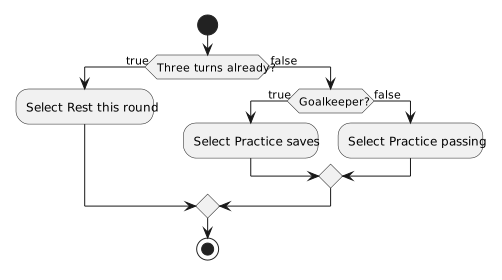
Check the turn limit first. Only its false route checks goalkeeper status. Select one instruction and merge.
Represent if/else if Statements in an Activity Diagram
  • New
  • Changed
  • Removed
Trace One Route at a Time

Trace a player with 2 turns, first as a goalkeeper and then as a player who is not a goalkeeper. Both paths visit the two diamonds; they select Practice saves and Practice passing, respectively. Neither path visits the other instruction action.

Verify the Drawing Against the Code
Predict and Check a Route