1.6.2 Representing Nested if Statements in Activity Diagrams

Representing Nested if Statements in Activity Diagrams

The Wildcats check a player's role only when the player is available. Nesting means the inner decision is reached on one outer route.

Read the Code Before Drawing

This excerpt is inside an existing method. The Boolean inputs isAvailable and isGoalkeeper already exist; instruction stores the selected text.

If the underlying C# feature is unfamiliar, use the lesson below while reading this example.

Source to translate
string instruction;

if (isAvailable)
{

    if (isGoalkeeper)
    {
        instruction = "Guard the goal";
    }
    else
    {
        instruction = "Practice passing";
    }
}
else
{
    instruction = "Wait";
}
Rewrite the Meaning in Ordinary Words
Pseudocode for the same behavior
Check whether the player is available
If unavailable, select Wait
If available, check whether the player is a goalkeeper
For an available goalkeeper, select Guard the goal
For another available player, select Practice passing
Continue after the selected instruction

Use these words to follow one execution before drawing it. Keep the same order and the same alternatives as the source; simplify the wording without adding work that the code does not perform.

Map the Source to Nodes and Arrows
Build the Diagram in Violet
  1. Create an activity diagram with start connected to Player available?.
  2. On its true route place a second diamond labeled Goalkeeper?. On its false route place Set instruction to Wait.
  3. Connect Goalkeeper? true to Set instruction to Guard the goal and false to Set instruction to Practice passing. Keep each arrow label next to its own decision.
  4. Merge the inner alternatives, then bring that result together with the outer Wait route before the final node. The diagram may use successive merge diamonds to show the nesting.
  5. Save and trace an unavailable goalkeeper first. That execution must never visit Goalkeeper?, even though the player's role is known.
Compare the Completed Soccer Diagram

Compare this reference with the diagram you built in Violet. Layout may differ; the source meaning, labels, and relevant connections should agree.
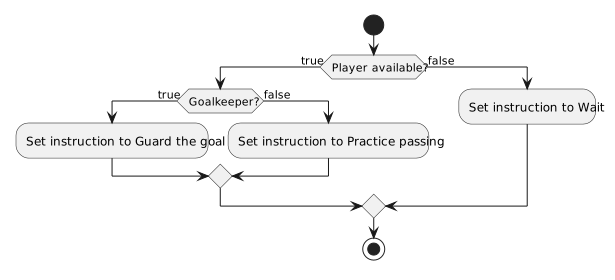
Only available players reach the goalkeeper decision; unavailable players select Wait without evaluating role.
An inner decision belongs on one outer branch
  • New
  • Changed
  • Removed
Trace One Route at a Time

An unavailable goalkeeper selects Wait after only the first check. An available non-goalkeeper reaches both checks and selects Practice passing.

Verify the Drawing Against the Source
Predict and Check a Small Change