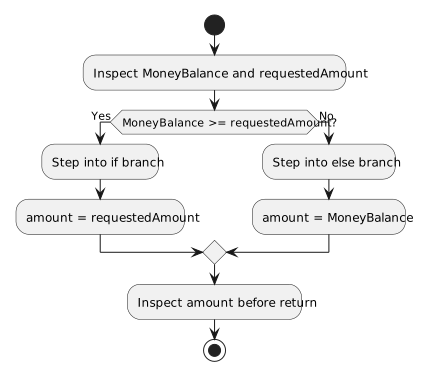
1.5.13 Debugging if and if/else Statements

Debug the Condition Before Changing the Code

When a decision behaves unexpectedly, first identify:

  1. the condition;
  2. the current values used by the condition;
  3. the result you expect;
  4. the branch you expect to run.

Then use the debugger to compare your prediction with the actual execution path.

Pause Before the Decision

Consider:

if (player1.isAvailable)
{
    System.Console.WriteLine("Available");
}
else
{
    System.Console.WriteLine("Unavailable");
}

Pause before or on the decision and inspect:

player1.isAvailable

Suppose it is:

false

Predict:

if block → skipped
else block → runs

Then step through the decision.

Debug Equality by Inspecting the Current Value

For:

if (player1.position == "Goalkeeper")

inspect:

player1.position

If the debugger shows:

"Forward"

predict:

"Forward" == "Goalkeeper" → false

The true block should be skipped.

Debug Numeric Boundaries Carefully

Suppose:

if (team1.score >= 3)

Check important values:

2 >= 3 → false
3 >= 3 → true
4 >= 3 → true

If the code behaves incorrectly at the boundary, inspect whether the operator matches the requirement.

Debug a Null Check by Inspecting the Reference

For:

if (player1.team == null)

inspect:

player1.team

If it shows:

null

predict true.

If it shows an actual Team object, predict false.

Step Over and Watch Which Branch Becomes Active

Use F10 / Step Over.

For a basic if/else:

condition true  → enter if block
condition false → enter else block

The highlighted source path provides runtime evidence.

Check Whether the Input Value Was Established Yet

Suppose you expected:

score = 3

but the debugger shows:

score = 0

The defect may occur before the if.

Ask:

  • Has the assignment executed?
  • Is this the intended object?
  • Is this the intended local variable?
  • Did the method receive the expected parameter?
  • Are you paused at the correct execution point?

A correct condition can still choose the wrong path if its input state is wrong.

Distinguish a Wrong Condition from a Wrong Branch Action

Consider:

if (player1.isAvailable)
{
    System.Console.WriteLine("Unavailable");
}
else
{
    System.Console.WriteLine("Available");
}

If:

isAvailable = true

the debugger correctly enters the if block.

The condition is working.

The branch action is wrong.

Debugging means comparing both the path and the action with the requirement.

Trace a Parameter into the Condition

Suppose:

player1.DisplayStatus(false);

calls:

public void DisplayStatus(bool available)
{
    if (available)
    {
        System.Console.WriteLine("Available");
    }
    else
    {
        System.Console.WriteLine("Unavailable");
    }
}

Trace:

argument false
   ↓
parameter available = false
   ↓
condition = false
   ↓
else block

The debugger can confirm each stage.

Use the Call Stack When Needed

If the condition is inside a method, the Call Stack can help identify which caller brought execution there.

That matters when the same method can be called from several places with different arguments.

Make One Evidence-Supported Correction

Avoid random edits.

A stronger process is:

read requirement
   ↓
inspect runtime values
   ↓
evaluate condition
   ↓
predict branch
   ↓
step through
   ↓
compare observed behavior
   ↓
correct the specific defect
Current Learning Boundary

This activity focuses on debugging:

  • one if;
  • or one if/else.

Debugging chained and more complex conditional return behavior is taught later.

Key Idea

A strong debugging explanation connects:

  • the runtime value;
  • the Boolean result;
  • the branch selected;
  • the requirement.

That evidence tells you whether the defect is in the input state, the condition, or the action inside the branch.