1.5.2 Representing Method Returns in Class Diagrams

Overview

A UML class diagram describes what a class offers. A method's entry can include its name, parameters, and return type. The return type tells a reader what kind of result a call can receive.

For an airline Flight class, a method that calculates open seats can be written in the operations section as:

+ GetAvailableSeats(): int

Read this as: the public method GetAvailableSeats takes no arguments and returns an int.
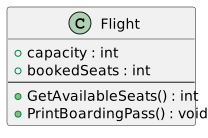
Flight has two integer fields; GetAvailableSeats returns int and PrintBoardingPass returns void.
Return Types in the Flight Class
  • New
  • Changed
  • Removed
Method notation
Part What it tells you
+ The method is public.
GetAvailableSeats The name of the method to call.
() The method has no parameters.
: int The returned value has type int.

The colon and type appear after the parameter list in the diagram. In C#, the return type appears before the method name:

public int GetAvailableSeats()

The locations differ, but both describe the same contract.

Read a Flight Class Diagram

An operation that returns a result and an operation that only performs an action need different descriptions:

Flight
-----------------------------
+ capacity: int
+ bookedSeats: int
-----------------------------
+ GetAvailableSeats(): int
+ PrintBoardingPass(): void

The lines separate the class name, attributes, and operations. GetAvailableSeats provides an integer; PrintBoardingPass does not provide a value for the caller to use.

If a method accepts an input, show it inside the parentheses and leave the return type after them:

+ CalculateFare(distanceMiles: int): decimal

Here, distanceMiles: int describes an input; : decimal after the closing parenthesis describes the output. Those are two different directions of information flow.

When reading a class diagram, look after the parentheses to discover whether a call can provide a result. The next page shows what the caller can do with that result in C#.