The Math Class Provides Common Numeric Operations
C# includes a built-in class named:
It provides useful methods for common calculations.
Instead of writing your own code for every mathematical operation, you can call a method on Math.
Examples include:
Math.Abs(...)
Math.Round(...)
Math.Max(...)
Math.Min(...)
Each method performs a specific numeric task.
Math Methods Are Called on the Class
Earlier, you called instance methods on objects:
The Math class is used differently.
For example:
double distance = Math.Abs(-12.5);
You call:
directly through the class name.
You do not create a Math object first.
Math.Abs Returns the Absolute Value
Consider:
double difference = Math.Abs(-8.5);
The result is:
The method returns the non-negative magnitude of the supplied number.
A soccer example might calculate the difference between two positions:
double fieldDifference = Math.Abs(playerX - ballX);
The goal is to know how far apart the values are, regardless of which one is larger.
Math.Max Chooses the Larger Value
Consider:
int highestScore = Math.Max(homeScore, awayScore);
If:
homeScore = 3
awayScore = 1
then:
The method compares the supplied values and returns the larger one.
Math.Min Chooses the Smaller Value
For:
int lowestScore = Math.Min(homeScore, awayScore);
the method returns the smaller value.
These methods can make a calculation easier to read than writing more decision logic for a simple numeric choice.
Math.Round Rounds a Numeric Value
Suppose:
double average = 7.6;
double roundedAverage = Math.Round(average);
The returned value is the rounded numeric result.
The exact rounding behavior can depend on the overload and values involved.
For this activity, focus on the basic idea:
Methods on Math Still Use Arguments
For:
the value:
is an argument.
For:
Math.Max(homeScore, awayScore)
two arguments are supplied.
This connects the Math class to what you already know about method parameters and arguments.
The Method Call Can Be Part of a Larger Expression
Consider:
double adjustedDistance = Math.Abs(playerX - ballX);
C# first evaluates:
Then that result becomes the argument to:
The value returned by Math.Abs is then assigned to:
This creates a clear flow:
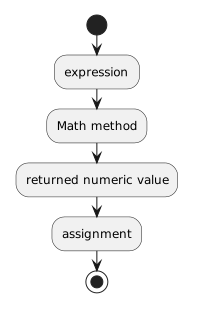 Expression.
Store the Result When You Need It Later
A local variable can hold a calculation result:
double distance = Math.Abs(playerX - ballX);
Now the method can use:
later in the same scope.
Local variables are introduced more fully later in this batch.
Choose the Math Method that Matches the Question
Ask what the calculation needs.
Need the magnitude of a number?
Need the larger of two values?
Need the smaller of two values?
Need a rounded numeric value?
Use:
Do not choose a method merely because its name looks familiar.
Math Does Not Replace Your Program's Domain Logic
A soccer application may need rules involving:
- player availability;
- team membership;
- match state.
Those are domain decisions.
The Math class helps with numeric calculations.
Use it when the problem is genuinely mathematical.
The Main Pattern
A Math call looks like:
Math.MethodName(arguments)
It accepts numeric information, performs a defined calculation, and produces a numeric result that your code can use.