Predict Before Pressing F10
A useful debugging habit is:
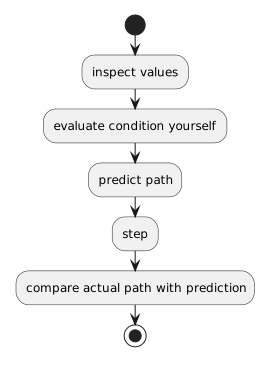
- New
- Changed
- Removed
Do not use the debugger only as a way to discover what happened after the fact.
Use it to test your reasoning.
An if statement depends on a Boolean result.
For example:
if (score >= 3)
{
    System.Console.WriteLine("Three or more goals.");
}
When debugging, you can inspect the values that make the condition true or false.
This helps answer:
Set a breakpoint before or at the decision statement.
Suppose the current code is:
if (score >= 3)Before stepping, inspect:
scoreIf the debugger shows:
score = 2you can predict:
2 >= 3 → falseThe controlled block should be skipped.
A useful debugging habit is:
Do not use the debugger only as a way to discover what happened after the fact.
Use it to test your reasoning.
Suppose:
if (player1.position == "Goalkeeper")Inspect:
player1.positionIf the current value is:
"Forward"predict:
"Forward" == "Goalkeeper" → falseThen step and observe whether the block is skipped.
Suppose:
if (player1.team == null)Inspect:
player1.teamIf the debugger shows:
nullthen the condition should evaluate to true.
If the debugger shows an expandable Team object, the condition should evaluate to false.
Consider:
if (!player1.isAvailable)If the debugger shows:
player1.isAvailable = falseevaluate:
falsethen apply:
!to get:
trueThe block should run.
For:
if (distanceToBall < 5.0)inspect:
distanceToBallIf:
distanceToBall = 4.5then:
4.5 < 5.0 → trueIf the block does not behave as predicted, re-check:
If execution pauses before a previous assignment, the variable may not yet have the value you expected.
For example:
distanceToBall = 4.5;
if (distanceToBall < 5.0)
If you pause before the assignment executes, the debugger may show an earlier value.
Always ask:
The current debugger tools can show:
You do not need to guess which value an expression is using.
Inspect the values that feed the condition.
Suppose:
if (score >= 3)is logically correct.
But the debugger shows:
score = 1when the requirement expected 4.
The defect may be in an earlier calculation or assignment rather than in the if statement.
The condition evaluates the state it receives.
A strong debugging explanation sounds like:
That explanation connects:
For every conditional expression:
That process turns conditional debugging into evidence-based reasoning.