1.2.20 Navigating Code With Go to Definition

Go To Definition Takes You to Where a Symbol Is Defined

When you encounter:

C#
Player player1 = new Player();

you may want to see:

Where is Player defined?

Visual Studio's Go To Definition command can navigate to the definition associated with the selected symbol.

F12 is a common shortcut in Visual Studio.

Use It to Follow Types and Members

You can use Go To Definition on a custom type such as:
Plain text
Player

to inspect the Player class.

You can also use it on a field or member name when a source definition is available.

Navigation Helps You Answer Structural Questions

Examples:

Which fields does Player define?

What type is team?

Where is this member declared?

Instead of guessing from the current file, navigate to the actual definition.

Return to the Calling Code After Inspecting the Definition

Code navigation can move you away from the original file.

Use Visual Studio's normal navigation history to return to the prior location when needed.

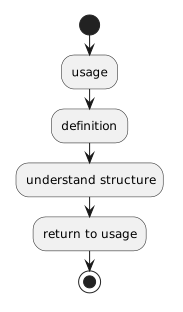
The exact interface can vary, but the reasoning stays the same:

Plain text
usage
  ↓
definition
  ↓
understand structure
  ↓
return to usage

Go To Definition and Find All References Answer Different Questions

Go To Definition

Where is this symbol defined?

Find All References

Where is this symbol used?

Using both tools makes an unfamiliar solution much easier to explore.