1.1.7 Using AI to Assist in Writing Comments

AI Can Suggest Comment Wording

Generative AI can help draft a code comment.

For example, you might provide a small, permitted C# snippet and ask:

Write one concise single-line comment explaining the purpose of this object creation.

The AI may produce something like:

C#
// Create the Player instance represented in the current model.

That suggestion can be useful.

It is still generated output that you need to evaluate.

Understand the Code Before Asking AI to Explain It

Do not use an AI-generated comment as a substitute for understanding the statement.

Before requesting a comment, you should be able to explain:

If you cannot explain the code, you cannot reliably judge whether the generated comment is accurate.

Share Only the Code Needed for the Task

Responsible AI use includes data minimization.

If one line is enough to explain the question, do not upload an entire private project.

A small instructional example is:

C#
Player player1 = new Player();

The AI does not need:

Use only information you are permitted to provide to the AI tool.

Give the AI a Clear Comment Goal

Compare:

Comment this.

with:

Write one concise C# single-line comment that explains why this Player object is being created. Do not repeat the syntax.

The second prompt gives a clearer task.

It tells the AI:

Prompt precision helps produce a more useful draft.

Evaluate Whether the Comment Is Accurate

Suppose the code is:

C#
Player player1 = new Player();

and the AI suggests:

C#
// Load the current player from the database.

That comment invents behavior that the statement does not show.

Reject it.

The new Player() expression creates a Player object.

It does not prove that a database was accessed.

Reject Comments That Invent Intent

An AI can guess why code exists.

For example:

C#
// Create the team captain.
Player player1 = new Player();

Nothing in the statement proves that player1 is the captain.

Unless the requirement or surrounding source supports that meaning, the comment is unreliable.

A comment should not turn a plausible guess into documented "fact."

Revise Overly Obvious Comments

AI may produce:

C#
// Create a new Player object.
Player player1 = new Player();

The comment is accurate but adds little value.

You can revise it into something more useful:

C#
// Create the Player instance represented by player1 in the UML diagram.

The revised version explains the design connection.

Keep the Comment Within the Current Learning Scope

An AI system may explain the line using advanced terminology that has not been introduced.

For example, it might discuss:

Those concepts are unnecessary for a simple Module 1.1 comment.

Use language that matches the code and your current understanding.

Apply the AI Decision Framework

After receiving a suggested comment, choose an action.

Accept

The comment is accurate, useful, permitted, and already fits the code.

Revise

The comment has a useful idea but needs clearer or more accurate wording.

Verify

The comment includes a factual claim about the project or requirement that you need to confirm.

Reject

The comment invents behavior, misreads the code, exposes inappropriate information, or does not help the reader.

The Final Comment Is Your Responsibility

AI can produce wording.

You are responsible for deciding whether the wording accurately documents the code you are submitting.

A useful process is:
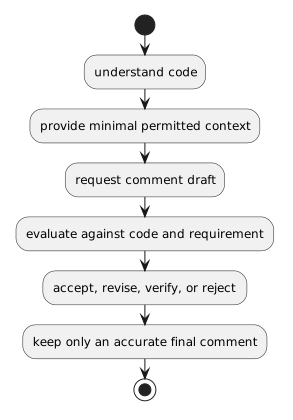
Plain text
understand code
      ↓
provide minimal permitted context
      ↓
request comment draft
      ↓
evaluate against code and requirement
      ↓
accept, revise, verify, or reject
      ↓
keep only an accurate final comment

The result should help a human reader understand the source—not merely demonstrate that an AI tool was used.