1.1.24 Understanding Object Memory

Objects Exist in Memory While the Program Runs

When C# executes:

Player player1 = new Player();

the new Player() expression creates a Player object in memory.

The object can contain state such as:
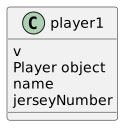
Class diagram showing player1, then v, then Player object, then name, then jerseyNumber.
Player.
  • New
  • Changed
  • Removed

The reference and the object are related, but they are not the same thing.
The Object Holds Its Fields

Suppose the code then executes:

player1.name = "Jordan";
player1.jerseyNumber = 7;

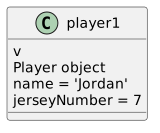
Conceptually, the state can be pictured as:

Class diagram showing player1, then v, then Player object, then name = "Jordan", then jerseyNumber = 7.
Player.
  • New
  • Changed
  • Removed

The values belong to the object.

The reference gives the program access to that object.

Related Objects Are Separate Objects

Now create a Team:

Team team1 = new Team();
team1.name = "Wildcats";

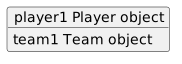
There are now two objects in memory:

Object diagram showing player1 Player object, then team1 Team object.
Player1PlayerObject.
  • New
  • Changed
  • Removed

If the Player should refer to the Team:

player1.team = team1;

the objects remain separate. A reference connects them.

Conceptually:

player1 → Player object ──team──→ Team object ← team1
Memory Is Different from a UML Diagram

A UML object diagram is a model.

The runtime memory is the actual state created by the executing program.

The UML may show:

player1 : Player -------- team1 : Team

C# instructions create those objects and relationships.

The debugger lets you observe the runtime version.

Memory Is Also Different from a File

If the program closes, its normal runtime objects do not remain alive in memory as the same running objects.

Persistent storage is a separate concept.

Do not confuse:

object exists in current program memory

with:

information has been saved to a file
The Debugger Gives You a Window into Memory

Visual Studio does not show every low-level hardware detail.

It gives you a useful programming view:

  • object references;
  • object types;
  • field values;
  • nested referenced objects.

That is enough to reason about the object model at this stage.

Avoid Over-Interpreting the Picture

Conceptual boxes and arrows help you reason about objects.

They are not literal diagrams of physical RAM addresses.

The important relationships are:

  • which references exist;
  • which objects they reach;
  • what state those objects contain;
  • which references are null .

Later modules explore shared references more deeply.

For now, use memory as the place where the running program's object state exists.