Visual Studio can report problems discovered while analyzing or building a project.
The course's errors view gives you a central place to inspect those diagnostics.
A useful question is:
What is the tool telling me, and where should I investigate?
The goal is not to make every message disappear by random editing.
The goal is to understand the current evidence.
Consider:
player1.jerseyNumber = "seven";
If jerseyNumber is an int, the string:
"seven"
does not match the expected numeric field type.
C# can report a type-related error.
The diagnostic helps identify that the current source cannot be compiled as written.
When an error appears:
Do not begin changing unrelated classes because one line has a type mismatch.
A syntax problem can affect code that comes after it.
For example, a missing semicolon:
player1.name = "Jordan"
player1.jerseyNumber = 7;
may cause Visual Studio to report a problem at or near the next statement.
Inspect both the reported line and the nearby source.
The tool is telling you where it became unable to interpret the code successfully.
A compiler error can prevent the program from building.
A runtime exception happens after the program has built and execution reaches a problematic situation.
For example:
player1.team.name
might be valid C# syntax.
If player1.team is null at runtime, the program may throw a NullReferenceException.
The source compiled.
The runtime state caused the failure.
Keep these evidence sources separate.
StyleCop can report a code-cleanliness issue even when the program builds.
That is not the same as:
Ask which tool produced the message and what kind of issue it represents.
This avoids treating every diagnostic as the same problem.
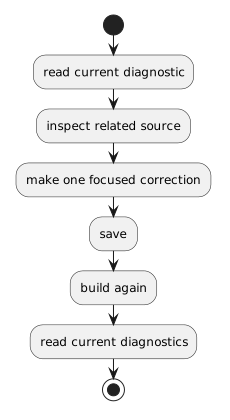
A useful correction cycle is:
read current diagnostic
↓
inspect related source
↓
make one focused correction
↓
save
↓
build again
↓
read current diagnostics
The new build result replaces the old one as the current evidence.
Do not keep correcting an old error message after the source has changed.
One missing symbol can cause several later messages.
If ten errors appear, do not assume ten independent mistakes exist.
Begin with the earliest clear problem you understand.
Correct it.
Build again.
Some later diagnostics may disappear because they were consequences of the first problem.
Do not respond to an error by:
Use the diagnostic to investigate the current source within the current teaching boundary.
The diagnostic can tell you something like:
this value is not compatible with that type
or:
this member cannot be found
It cannot decide what the correct requirement is.
Use the requirement, UML, and supplied source to determine what the code should mean.
Use the errors view to answer:
Why can't the current source build or satisfy the current code analysis?
Use the debugger to answer:
What is happening while the built program runs?
The next activity introduces runtime exceptions, which belong to that second category.