A C# program begins as source code.
Source code is text written using the rules of the C# programming language.
A tiny example might look like this:
class Program
{
static void Main()
{
System.Console.WriteLine("Soccer practice begins.");
}
}
You do not need to memorize this structure yet.
For now, notice that the program is made of text with a specific organization.
Visual Studio lets you edit that text, but the processor in your computer does not directly execute C# source text.
The program must go through a translation process.
When a .NET C# application is built, the C# compiler translates the source code into Common Intermediate Language, often called CIL or IL, along with metadata that describes the program.
A useful high-level path is:
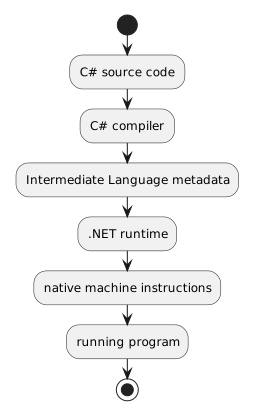
C# source code
↓
C# compiler
↓
Intermediate Language + metadata
↓
.NET runtime
↓
native machine instructions
↓
running program
This explains why writing code and running code are related but different activities.
Your .cs files are source.
The build process produces the form the .NET runtime can execute.
The Common Language Runtime, or CLR, is part of the .NET execution environment.
When managed .NET code runs, the runtime provides the environment needed to execute it.
The intermediate language is converted to native machine code for the computer, commonly through just-in-time compilation as methods are needed.
At this stage, you do not need to study the CLR in depth.
The important idea is:
C# source text is translated before the computer executes the instructions.
Because C# follows a formal language, the compiler expects the source code to follow C# syntax and type rules.
If the compiler cannot translate the current source successfully, the build can fail.
That is why a program can contain text that looks reasonable to a person but still fail to build.
For example, missing punctuation or an incomplete statement can prevent the compiler from understanding the intended instruction.
Later activities will show you how Visual Studio reports these problems.
Look again at the small example:
class Program
{
static void Main()
{
System.Console.WriteLine("Soccer practice begins.");
}
}
You do not need to know every term yet, but you can already notice several layers.
class Program
This introduces a class named Program.
You will study classes in much more detail later.
static void Main()
Main identifies a method used as the starting point in this small console-style example.
The WPF applications supplied in the course will have a different visible structure, but they still contain organized C# code that the build system compiles.
System.Console.WriteLine("Soccer practice begins.");
This statement requests an action: display text.
Later modules will examine many other kinds of statements.
For now, simply recognize that source files contain structured instructions.
C# frequently uses braces:
{
}
to show which statements belong inside a larger structure.
In the example, one pair surrounds the class.
Another pair surrounds the method.
Indentation makes this nesting easier for people to read.
The compiler follows the language structure rather than judging the code by visual neatness alone, but consistent layout makes errors easier for humans to notice.
C# source code can contain comments.
For example:
// Display a short message.
System.Console.WriteLine("Soccer practice begins.");
The comment helps a person understand the source.
The comment is not an instruction that produces the displayed message.
You will use comments more deliberately later in the programming sequence.
This is similar to other representations you have already encountered.
A UML object diagram represents a system visually.
C# source represents instructions in a programming language.
Intermediate language represents compiled .NET instructions.
Native machine code represents instructions the processor can execute.
These are not interchangeable artifacts, but they are connected views of the same software process.
When you work in Visual Studio, remember the high-level flow:
Write or inspect source → Build → Run
Later you will add another important activity:
Observe what happens while it runs
That is where development and debugging tools become especially useful.
For now, your goal is to recognize that the text in a C# file is source code with structure, and that Visual Studio and .NET translate that source before the application executes.