1.1 Airline Learning Activity
Folder Structure and Naming Conventions
Go to top
Create an object diagram based on the information below.
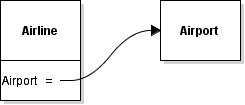
FieldReferenceExample.png
An Airline has a Name of AeroWisco.
An Airline has an EmployeeCount of 12.
An Airline has an Airport of type Airport
An Airline has an Airplane of type Jet
An Airline's Airplane has a Model of 319
An Airline's Airplane has a Manufacturer of Airbus
An Airline's Airplane has a Name of Spirit of the Forest
An Airline's Airplane has a LengthInMeters of 33.84
An Airline's Airport has a Name of CWA
An Airline's Airport has an Employees of 10.
An Airline's Airport has a MainTerminal of type Terminal
An Airport's Terminal has a GateA of type Gate
GateA has a HasSkyway of true
GateA has a PlaneSideCheckLuggage of false
GateA has a Number of 3A
An Airport's Terminal has a GateB of type Gate
GateB has a HasSkyway of false
GateB has a PlaneSideCheckLuggage of true
GateB Gate has a Number of 3B
Go to top
Save diagram and submit to Feedback System.
Save the diagram by clicking File | Save in Violet.
Make sure the naming convention of the .html file is: Airline 1.1 LastName
Ensure that Violet adds a .object.violet.html extension to the file when saving.
Zip the html file and submit the .zip file to the Feedback System.
Make sure to zip the html file and not a folder with the html file inside.
Make sure the naming convention of the .zip file is: Airline 1.1 LastName
Correct any mistakes based on Feedback.
Re-open file in Violet.
Correct any errors based upon feedback returned.
Save.
Re-zip the .html file.
Re-submit to Feedback System.
Repeat the process as necessary until all feedback is resolved.
Submit the resulting Feedback to Canvas as a URL.
Go to top