This page is currently being built. Please check back soon.
2.5 Zoo Learning Activity — overview
Work through the user stories in order. Each story states the goal and acceptance criteria; its nested tasks retain the detailed implementation and verification steps.
2.Copy your 2.4 ending code, renaming both the folder and the Visual Studio solution file
AVerify the required change or observation
Check the result against this instruction: Copy your 2.4 ending code, renaming both the folder and the Visual Studio solution file
3.Build your solution and ensure it compiles without warnings or errors
AVerify the required change or observation
Check the result against this instruction: Build your solution and ensure it compiles without warnings or errors.
Construct employees, booths, and guests with their values
Problem
Currently the MainWindow is handling the instantiation of the employees, booth and guest AND assigning field values when it really should be the responsibility of the class to handle assigning those values.
Solution
You will instantiate the employees, booth and guest in the MainWindow and pass values into a constructor that will then handle assigning values.
4.Review the feature design
AIdentify the contracts and expected behavior
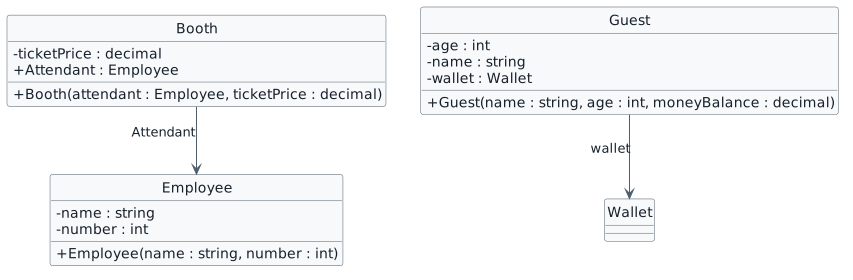
This focused design shows the members or flow relevant to this feature. Keep unchanged members from your preceding checkpoint; follow the tasks below for the order of intermediate edits.
CIn the constructor, assign the name field to the name parameter and the number field to the number parameter
public Employee(string name, int number)
{
    this.name = name;
    this.number = number;
}
DIn the MainWindow in the newComoZooButton_Click, delete the lines of code that instantiate and assign values of the Doctor and Attendant
EIn the MainWindow in the newComoZooButton_Click above the instantiation of the comoZoo, define a variable of type Employee named attendant and assign it to a new instantiation of the Employee class and pass in the string "Sam" and the number 42 as arguments
FOn the next line, define a variable of type Employee named doctor and assign it to a new instance of the Employee class and pass in the string "Flora" and the number 98
CIn the constructor, assign the Attendant field to the attendant parameter and the ticketPrice field to the ticketPrice parameter
DIn the MainWindow in the newComoZooButton_Click, delete the lines of code that instantiate and assign values of the Booth
EBelow the lines of code that instantiate the Employees, define a variable of type Booth named booth, assign it to a new instance of the Booth class and pass in the attendant object and 15.00m as arguments
CIn the constructor, assign the age field to the age parameter and the name field to the name parameter
DIn the MainWindow in the newComoZooButton_Click and newSanDiegoZooButton_Click methods, delete the lines of code that instantiate and assign values of the Visitor
EIn the newComoZooButton_Click below the line of code that instantiates the Booth, define a variable of type Guest named visitor, assign it to an instance of the Guest class, and pass in the string "Darla", the number 11 and the decimal value 5.25m
FIn the newSanDiegoZooButton_Click below the line of code that instantiates the Booth, define a variable of type Guest named visitor, assign it to an instance of the Guest class, and pass in the string "Dave", the number 13 and the decimal value 3.75m
GIn the constructor, call the AddMoney method and pass in the moneyBalance parameter as an argument
Check the result against this instruction: Refactor the code in the MainWindow for the newSanDiegoZooButton_Click so that the Employees, Booth, and Guest are instantiated using constructors.
9.Check Your Work (Como Zoo):
ASet a breakpoint in the newComoZooButton_Click on the line that assigns the attendant variable
BStart the application. Click the New Como Zoo button
CPress F11. Step through the constructor and return to the MainWindow
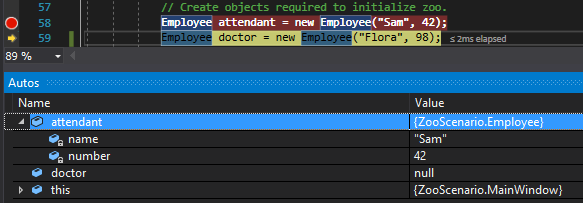
DPress F11. Ensure that the attendant variable is an instance of the Employee class with the name Sam with the number 42
Check Your Work: Attendant Values
EPress F10. Ensure that the doctor variable is an instance of the Employee class with the name Flora and the number 98
FPress F11. Step through the constructor and return to the MainWindow
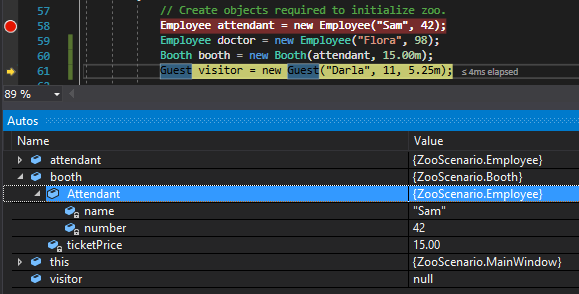
GPress F11. Ensure that the booth is an instance of Booth class with an Attendant with the name Sam and number 42 and a ticketPrice of 15.00
Check Your Work: Booth Values
HPress F11. Step through the constructor and return to the MainWindow
IPress F11. Ensure that the visitor is an instance of the Guest class with an age of 11, name of Darla and a wallet object with a moneyBalance of 5.25
10.Check Your Work (San Diego):
ASet a breakpoint in the newSanDiegoZooButton_Click on the line that assigns the attendant variable
BStart the application. Click the New San Diego Zoo button
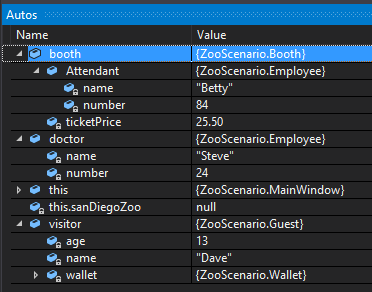
CStep over the instantiation of the Employees, Booth and Guest. Ensure that the values match the values below
Check Your Work: San Diego Zoo Values
Construct a complete zoo and its facilities
Problem
The MainWindow is handling the instantiation of the animal snack machine, birth area , restrooms and zoo AND assigning their values, when it should be the the responsibility of the class to handle that.
Solution
You will instantiate the animal snack machine, birth area, restrooms and zoo and pass values into a constructor that will then handle assigning values.
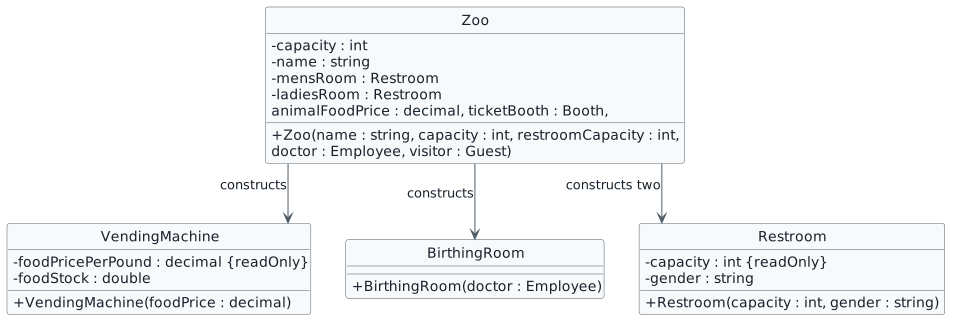
11.Review the feature design
AIdentify the contracts and expected behavior
This focused design shows the members or flow relevant to this feature. Keep unchanged members from your preceding checkpoint; follow the tasks below for the order of intermediate edits.
Construct zoo facilities
NNew
CChanged
RRemoved
Zoo constructor configuration
Argument
Como
San Diego
name
Como Zoo
San Diego Zoo
capacity
1000
3000
restroomCapacity
4
12
animalFoodPrice
0.75m
1.20m
12.Refactor the animal snack machine
AIn the VendingMachine class, change the visibility of the FoodPricePerPound and FoodStock from public to private and change the names to foodPricePerPound and foodStock. Make the foodPricePerPound field readonly
BChange all references to FoodPricePerPound and FoodStock to the proper camel casing
CDefine a constructor with the parameter foodPrice of type decimal
DIn the constructor, assign the foodPricePerPound to the foodPrice parameter
EIn the constructor, add a while loop that fills the snack machine when initialized. Model the while loop after the while loop in the FillVendingMachine code in the Employee class
FIn the MainWindow, delete the lines of code that instantiate and reference the AnimalSnackMachine
13.Refactor the birthing room
AIn the BirthingRoom class, modify the existing constructor by adding a parameter of type Employee named doctor
AIn the Restroom class, change the visibility of the Capacity and Gender fields from public to private and rename the fields to capacity and gender. Make the capacity field readonly
BDefine a constructor with the parameters capacity of type int and gender of type string
CAssign the readonly capacity field to the capacity parameter and the gender field to the gender parameter
DIn the MainWindow, delete the instantiation and references to MensRoom and LadiesRoom
15.Refactor the zoo
AIn the Zoo class, change the visibility of the Capacity, MensRoom, LadiesRoom, and Name from public to private and rename the fields to capacity, mensRoom, ladiesRoom, and name
BModify the Zoo constructor by adding the parameters name of type string, capacity of type int, restroomCapacity of type int, animalFoodPrice of type decimal, ticketBooth of type Booth, doctor of type Employee, and visitor of type Guest
CIn the MainWindow in the newComoZooButton_Click, move the line of code that instantiates the comoZoo below the lines of code that instantiate the Employees, Booth, and Guest and pas in the string "Como Zoo", 1000, 4, 0.75m, booth, doctor, and visitor
7Assign the TicketBooth field to the ticketBooth parameter
8Assign the Visitor field to the visitor parameter
EIn the MainWindow in the newSanDiegoZooButton_Click, move the line of code that instantia the sanDiegoZoo below the lines of code that instantiate the Employees, Booth, and Guest and in the string "San Diego Zoo", 3000, 12, 1.20m, booth, doctor, and visitor
FIn the MainWindow, delete the lines of code that assign the Capacity and Name fields for the Como and San Diego Zoos
16.Check Your Work (Como Zoo):
AIn the MainWindow in the newComoZooButton_Click, set a breakpoint on the line that instantiates the comoZoo
BStart the application. Click the New Como Zoo button
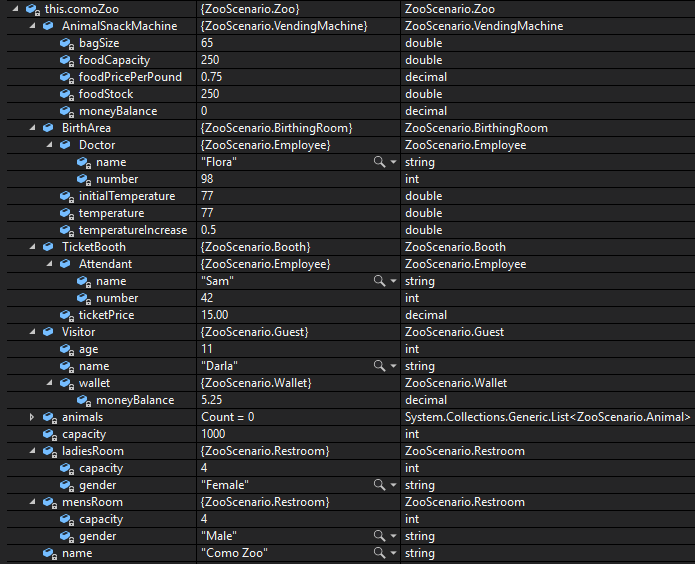
CPress F11 to step into the constructor. Step over the line that line that instantiates the Animals list. Ensure the animals list is instantiated and has a Count of 0
DPress F11 to step into the VendingMachine constructor. Ensure that that foodStock is 0
EUse F10 to step through the constructor. Ensure that the while loop runs until the foodStock is 250 and then return to the Zoo constructor
FStep over the instantiation of the BirthArea. Ensure that the BirthArea has a Doctor with the name Flora with the number 98
GStep over the line of code that assigns the capacity. Ensure it is assigned the value 1000
HStep over the lines of code that instantiate the ladiesRoom and mensRoom. Ensure that both have a capacity of 4, that the ladiesRoom has a gender of Female and that the mensRoom has a gender of Male
IStep over the line of code that assigns the name field. Ensure that it is assigned the value "Como Zoo"
JStep over the line of code that assigns the TicketBooth. Ensure that is has an Attendant with the name "Sam" with the number 42 and that the ticketPrice is 15.00
KStep over the line of code that assigns the Visitor. Ensure that it has a name of "Darla", age of 11 and a wallet with a moneyBalance of 5.25
LIn the MainWindow, expand the comoZoo object to ensure that all values match the values below
Check Your Work: Como Zoo Values
17.Check Your Work (SanDiegoZoo):
ASet a breakpoint in the newSanDiegoZooButton_Click on the line of code that instantiates the sanDiegoZoo
BStart the application. Click the New San Diego Zoo button
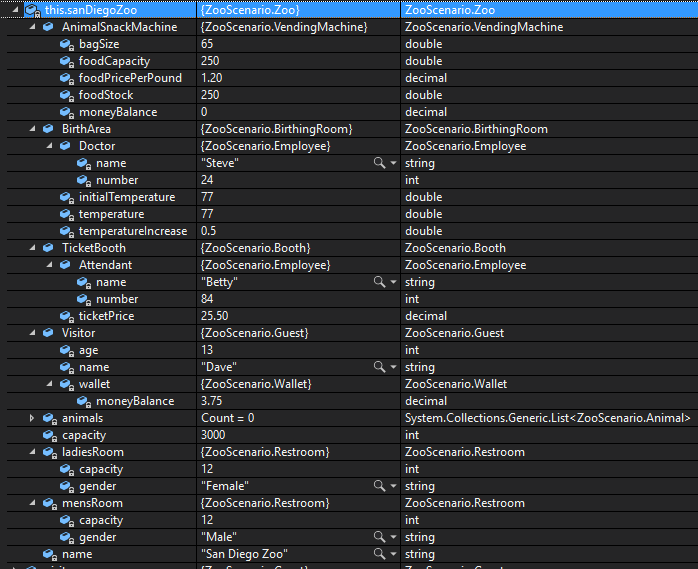
CPress F10. In the Autos window, ensure that the values of the sanDiegoZoo match the values below
Check Your Work: San Diego Zoo Values
Construct animals with their initial state
Problem
The MainWindow is handling the instantiation of the animals AND assigning their values, when it should be the the responsibility of the class to handle that.
Solution
You will instantiate the animals and pass values into a constructor that will then handle assigning values.
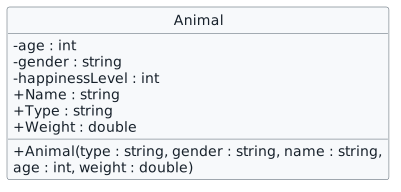
18.Review the feature design
AIdentify the contracts and expected behavior
This focused design shows the members or flow relevant to this feature. Keep unchanged members from your preceding checkpoint; follow the tasks below for the order of intermediate edits.
Initialize an animal in its constructor
NNew
CChanged
RRemoved
19.In the Animal class, change the visibility of the Age, Gender and HappinessLevel from public to private and rename the fields to age, gender and happinessLevel and change all references to lowercase
AVerify the required change or observation
Check the result against this instruction: In the Animal class, change the visibility of the Age, Gender and HappinessLevel from public to private and rename the fields to age, gender and happinessLevel and change all references to lowercase.
20.Define a constructor that has the parameters type of type string, gender of type string, name of type string, age of type int, and weight of type double
Check the result against this instruction: Define a constructor that has the parameters type of type string, gender of type string, name of type string, age of type int, and weight of type double.
21.In the constructor, assign the age field to the age parameter, the gender field to the gender parameter, the Name field to the name parameter, the Type field to the type parameter, and the Weight field to the weight parameter
AVerify the required change or observation
Check the result against this instruction: In the constructor, assign the age field to the age parameter, the gender field to the gender parameter, the Name field to the name parameter, the Type field to the type parameter, and the Weight field to the weight parameter.
22.In the MainWindow in the newComoZooButton_Click, instantiate Dolly the Dingo by passing in arguments
Check the result against this instruction: In the MainWindow in the newComoZooButton_Click, instantiate Dolly the Dingo by passing in arguments.
23.Instantiate Dixie the Dingo using the constructor
AVerify the required change or observation
Check the result against this instruction: Instantiate Dixie the Dingo using the constructor
24.Instantiate Pammy the Platypus using the constructor
AVerify the required change or observation
Check the result against this instruction: Instantiate Pammy the Platypus using the constructor
25.In the MainWindow in the newSanDiegoZooButton_Click, instantiate Patti the Platypus by using the constructor
AVerify the required change or observation
Check the result against this instruction: In the MainWindow in the newSanDiegoZooButton_Click, instantiate Patti the Platypus by using the constructor.
26.Instantiate Harold the Hummingbird by using the constructor
AVerify the required change or observation
Check the result against this instruction: Instantiate Harold the Hummingbird by using the constructor.
27.Delete the lines of code that assign the values of the animal object directly
AVerify the required change or observation
Check the result against this instruction: Delete the lines of code that assign the values of the animal object directly.
28.In the Animal class, instantiate the baby object using a constructor and delete the lines of code that assigned its values
AVerify the required change or observation
Check the result against this instruction: In the Animal class, instantiate the baby object using a constructor and delete the lines of code that assigned its values.
29.Check Your Work (Como Zoo):
ASet a breakpoint in the newComoZooButton_Click on the line of code that instantiates Dolly the Dingo
BStart the application. Click the New Como Zoo button
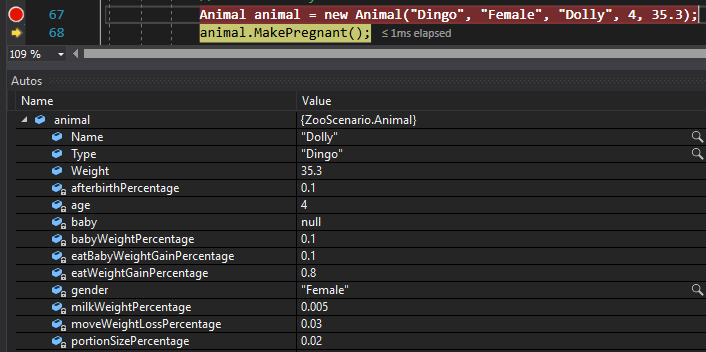
CPress F10. Ensure that the values of the animal match the values below
Check Your Work: Animal Values
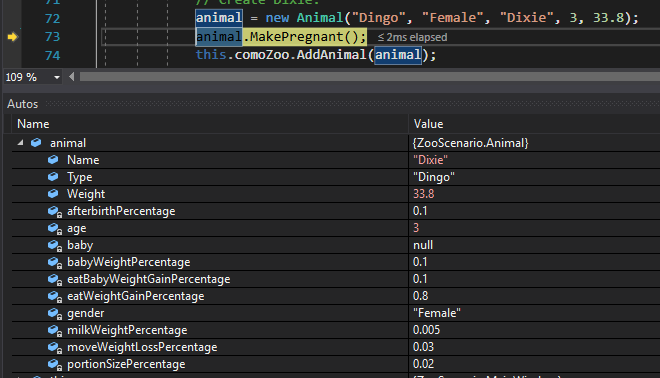
DPress F10 until the pointer hits the line of code that instantiates Dixie the Dingo
EPress F10. Ensure that the values of the animal match the values below
Check Your Work: Animal Values
FPress F10 until the pointer hits the closing curly brace. Ensure that the animals's Count is 3
30.Check Your Work (San Diego):
ASet a breakpoint on the closing curly brace of the newSanDiegoZooButton_Click
BStart the application. Click New San Diego Zoo
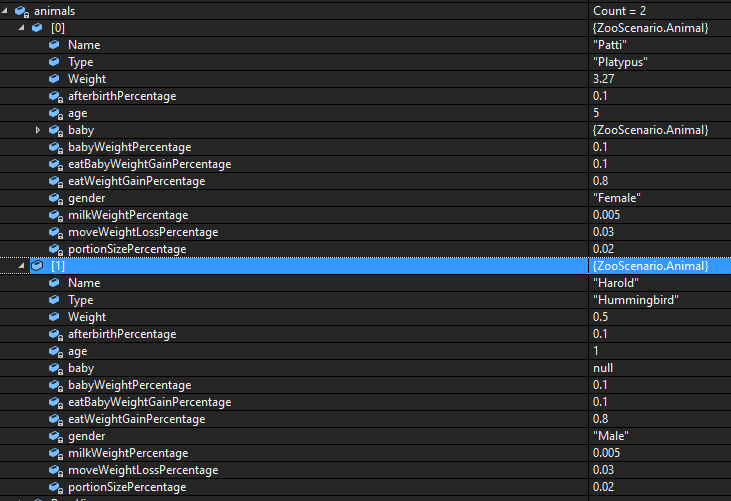
CIn the Autos window, ensure that the Animals list has the proper animals in it and that the values match
Check Your Work: Animal Values
Construct food with a weight
Problem
Food is instantiated in different places in the application for different reasons and the assigning of the fields is not taking place in the Food class when it should.
Solution
You will define a constructor in the Food class and use the constructor to instantiate food.
31.Review the feature design
AIdentify the contracts and expected behavior
This focused design shows the members or flow relevant to this feature. Keep unchanged members from your preceding checkpoint; follow the tasks below for the order of intermediate edits.
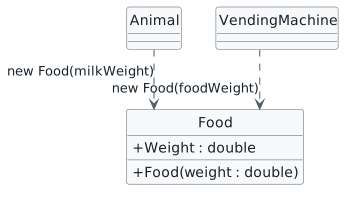
Initialize food in its constructor
NNew
CChanged
RRemoved
32.In the Food class, define a constructor with the parameter weight of type double
Check the result against this instruction: In the Food class, define a constructor with the parameter weight of type double.
33.In the constructor, assign the Weight field to the weight parameter
AVerify the required change or observation
Check the result against this instruction: In the constructor, assign the Weight field to the weight parameter.
34.In the Animal class in the Nurse method, pass in the milkWeight as an argument when instantiating the milk and delete the line of code that assigns the Weight field
Check the result against this instruction: In the Animal class in the Nurse method, pass in the milkWeight as an argument when instantiating the milk and delete the line of code that assigns the Weight field.
35.In the VendingMachine class in the SellFood method, pass in the foodWeight as an argument when instantiating the food and delete the line of code that assigns the Weight field
Check the result against this instruction: In the VendingMachine class in the SellFood method, pass in the foodWeight as an argument when instantiating the food and delete the line of code that assigns the Weight field.
36.Check Your Work (Como Zoo):
ASet breakpoints on the lines of code that instantiate Food objects
BStart the application. Click New Como Zoo. Click Darla feed dingo
CPress F10. Ensure that the Weight of the food is 0.3975
DClick Continue. Press the Birth dingo button
EPress F10. Ensure that the Weight of the milk is 0.1537
37.Check Your Work (San Diego):
ASet breakpoints on the lines of code that instantiate Food objects
BStart the application. Click New San Diego Zoo. Click Dave feed platypus
CPress F10. Ensure that the Weight of the food is 0.096
DClick Continue. Press the Birth platypus button. The milk-construction breakpoint is not hit because the platypus does not nurse in this scenario; its birth sequence can still proceed
Keep window statistics private
38.Review the feature design
AIdentify the contracts and expected behavior
This focused design shows the members or flow relevant to this feature. Keep unchanged members from your preceding checkpoint; follow the tasks below for the order of intermediate edits.
Private statistic fields
NNew
CChanged
RRemoved
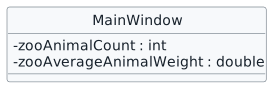
39.In the MainWindow class, change the visibility of the ZooAnimalCount and ZooAverageAnimalWeight from public to private and rename the fields to zooAnimalCount and zooAverageAnimalWeight
AVerify the required change or observation
Check the result against this instruction: In the MainWindow class, change the visibility of the ZooAnimalCount and ZooAverageAnimalWeight from public to private and rename the fields to zooAnimalCount and zooAverageAnimalWeight.
40.Change all references to ZooAnimalCount and ZooAverageAnimalWeight to the proper camel casing
AVerify the required change or observation
Check the result against this instruction: Change all references to ZooAnimalCount and ZooAverageAnimalWeight to the proper camel casing.
Submit your work
41.Ensure that all code is StyleCop compliant
AVerify the required change or observation
Check the result against this instruction: Ensure that all code is StyleCop compliant.
42.Zip the solution and submit to the Feedback System
AVerify the required change or observation
Check the result against this instruction: Zip the solution and submit to the Feedback System.
43.Submit the Feedback System url to the correct assignment in Canvas
AVerify the required change or observation
Check the result against this instruction: Submit the Feedback System url to the correct assignment in Canvas.
Completion checklist
44.Review the required evidence
ACheck every acceptance criterion
Return to each user story and confirm that you can demonstrate its acceptance criteria. Use the task checkboxes to track completion; a checked box is not a substitute for testing or inspecting the required evidence.
Remove temporary lines used only to demonstrate compile-time errors. Build without errors or warnings, check StyleCop compliance, and rerun the required scenario paths.
CFollow this activity’s submission instructions
Use the submission or attendance instructions in this page. For a Feedback System submission, upload the requested ZIP, review and resolve the feedback, and submit the resulting URL to the matching Canvas activity. For a Canvas quiz, enter only the requested answers; for an oral final, complete the scheduling and attendance steps.