2.4 Airline Learning Activity

Under Construction

This page is currently being built. Please check back soon.

A platypus
2.4 Airline Learning Activity — overview

Use the goals, acceptance criteria, and nested tasks below to prepare and complete this activity. Follow the stated scope carefully.
1.Gather your resources
A Open the assignment resources
Go to the completion checklist
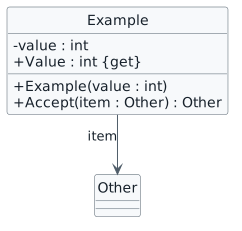
Represent the class view
2.Review the notation example
A Identify the notation used in this view
Class diagram notation example. class Example { - value : int + Example(value : int) + Value : int {get} + Accept(item : Other) : Other } Example --> Other : item
Class diagram notation example
  • New
  • Changed
  • Removed
2.4.1 How to Represent Private Fields and Methods in a Class Diagram 2.4.2 How to Represent Constructors in a Class Diagram 2.4.3 How to Represent Read-only Fields in a Class Diagram
3.Copy your 2.3 Airline Class Diagram, rename it to 2.4 and open it in Violet
A Verify the required change or observation

Check the result against this instruction: Copy your 2.3 Airline Class Diagram, rename it to 2.4 and open it in Violet.

4.Make the following fields and methods private in the Gate class

HasSkyway Name Plane PunchTicket

A Verify the required change or observation

Check the result against this instruction: Make the following fields and methods private in the Gate class.

5.Make the following fields and methods private in the Jet class

Model Name OpenCargoDoor

A Verify the required change or observation

Check the result against this instruction: Make the following fields and methods private in the Jet class

6.In the Airline class, make the Name field private and readonly
A Verify the required change or observation

Check the result against this instruction: In the Airline class, make the Name field private and readonly.

7.In the Airport class, define a constructor
A Verify the required change or observation

Check the result against this instruction: In the Airport class, define a constructor.

8.Verify the diagram against the evidence
A Inspect the rendered diagram

Open or render your diagram, inspect every label and relationship, and compare it with the code or debugger state. Resolve syntax errors, clipped labels and unreadable crossings before submission.
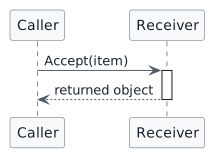
Represent the sequence view
9.Review the notation example
A Identify the notation used in this view
Sequence notation example. participant Caller participant Receiver Caller -> Receiver : Accept(item) activate Receiver Receiver --> Caller : returned object deactivate Receiver
Sequence notation example
  • New
  • Changed
  • Removed
2.4.4 How to Represent Constructors in a Sequence Diagram
10.Copy your Airline 2.2 Sequence Diagram, rename it to 2.4 and open it in Violet
A Verify the required change or observation

Check the result against this instruction: Copy your Airline 2.2 Sequence Diagram, rename it to 2.4 and open it in Violet.

11.Represent the call to the constructor that instantiates the CWA Airport object from the MainWindow
A Verify the required change or observation

Check the result against this instruction: Represent the call to the constructor that instantiates the CWA Airport object from the MainWindow.

12.Verify the diagram against the evidence
A Inspect the rendered diagram

Open or render your diagram, inspect every label and relationship, and compare it with the code or debugger state. Resolve syntax errors, clipped labels and unreadable crossings before submission.

Zip up the diagrams and submit to the Feedback System. Copy and paste the resulting URL into the…
13.Save and submit
A Carry out the source requirement

Zip up the diagrams and submit to the Feedback System. Copy and paste the resulting URL into the correct Canvas assignment.

Completion checklist
14.Review the required evidence
A Check every acceptance criterion

Return to each user story and confirm that you can demonstrate its acceptance criteria. Use the task checkboxes to track completion; a checked box is not a substitute for testing or inspecting the required evidence.

Represent the class view Represent the sequence view
B Follow this activity’s submission instructions

Use the submission or attendance instructions in this page. For a Feedback System submission, upload the requested ZIP, review and resolve the feedback, and submit the resulting URL to the matching Canvas activity. For a Canvas quiz, enter only the requested answers; for an oral final, complete the scheduling and attendance steps.