Overview
1.Download the starting code
A
Download the 1.1 Date Night starting zip file
B
Extract the contents of the zip file to a Date Night OneDrive folder
C
Rename the "Date Night 1.1 LastName" folder, replacing LastName with your last name
D
Within the folder renamed in the previous step, rename the file "Date Night 1.1 LastName.sln" file, replacing LastName with your last name
E
Right click the Solution and select 'Restore NuGet Packages'
2.Create a UML object diagram using Violet
A
Set a breakpoint on line 66 of MainWindow.xaml.cs. Start the application and click the New Harry and Sally date button
B
Create a UML object diagram to represent this.Harry and all of its sub-objects at this point in the application. Include the values of all fields and nested objects
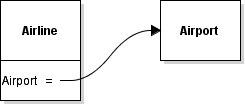
To make a reference from a field to an object, select the 'Object reference (from field)' tool and click and drag from the field to the object node.
3.Save diagram and submit to Feedback System
A
Save the diagram by clicking File | Save in Violet
1
Make sure the naming convention of the .html file is: Date Night 1.1 LastName
2
Ensure that Violet adds a .object.violet.html extension to the file when saving
B
Zip the html file and submit the .zip file to the Feedback System
1
Make sure to zip the html file and not a folder with the html file inside
2
Make sure the naming convention of the .zip file is: Date Night 1.1 LastName
C
Correct any mistakes based on Feedback
1
Re-open file in Violet
2
Correct any errors based upon feedback returned
3
Save
4
Re-zip the .html file
5
Re-submit to Feedback System
6
Repeat the process as necessary until all feedback is resolved
D
Submit the resulting Feedback to Canvas as a URL