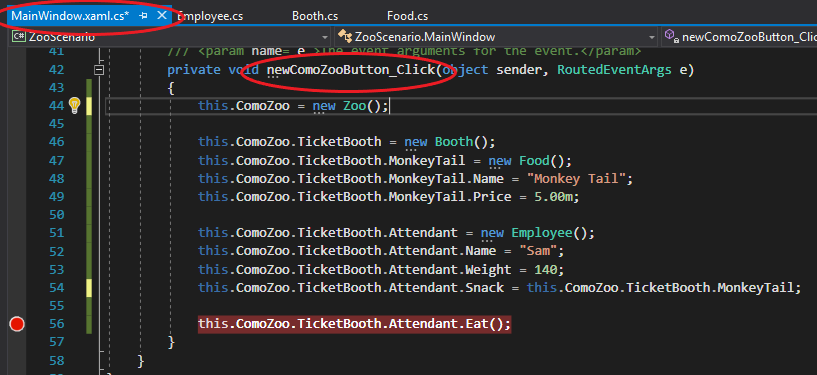
When wanting to call a method, you will need to use the 'dot' operator to access the method from an object. In the example below, we are calling the Eat method on the Attendant object.

If I were to place a breakpoint on the call to the Eat method...

...run the application, click the button for its event handler and press F11, the debugger will 'step into' that method.
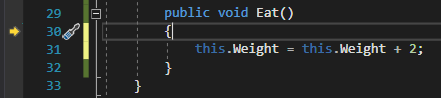
If I were to place a breakpoint on the call to the Eat method and press F10, however, the debugger will 'step over' the call, but the method will still execute.
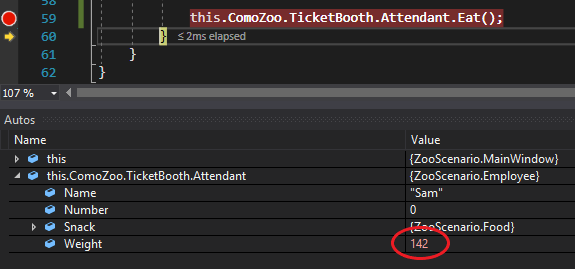
Note that the debugger is on the line after the method call indicating the method has been executed and that the Attendant's Weight field has changed.
Method calls in sequence diagrams are represented by a line coming from the method body where the call originated to the body of the method itself. The squares at the top of the diagram represent the 'object lifeline'. The object lifeline is notated by Object: Class. In this case the Attendant is the Object and the Employee is the class.
Sequence diagrams are read from top to bottom. In this case it is very simple because there is only one method being called, but sequence diagrams can grow quite large.
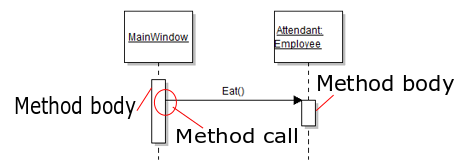
In the case above, the call to the Eat method is located in the method body of the newComoZooButton_Click event handler in the MainWindow class and is called on the Attendant object.
The Eat method itself is located in the Employee class (which the Attendant is).
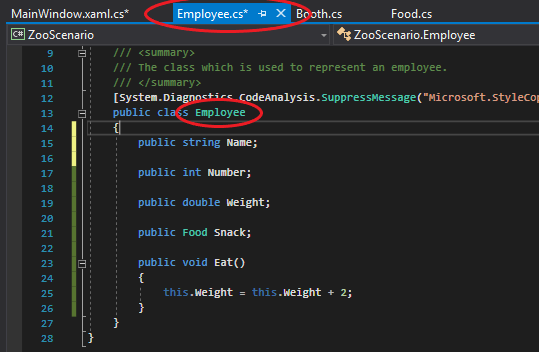
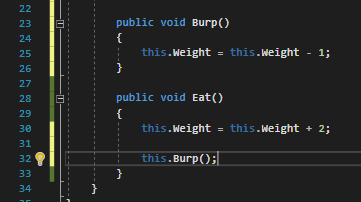
The example above shows a call from one class to another, but methods can also be called from within the same class. So I will add a Burp method to the Employee class and call it when the Employee Eats.
The sequence diagram now changes to the following:
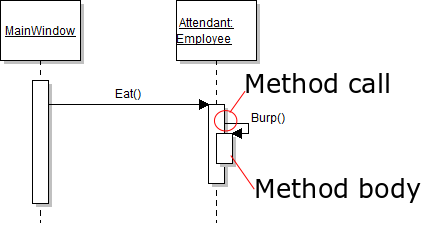
Note that the since the Burp method exists in the same class as the Eat method and is being called on the same instance, there is no need to call to another object lifeline.
Since sequence diagrams are read from top to bottom, this sequence diagram can be stated as: "The Eat method is called on the Attendant object from the MainWindow and then the Burp method is called from the Eat method."