For this example we will be creating a foreach Activity Diagram from the code below.
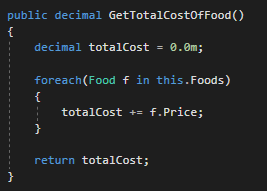
This method defines a local variable of type decimal and initializes it and then uses a foreach loop to loop through all of the Food objects in the Foods list and add each Food object's Price field to the totalCost variable. It then returns the totalCost variable. How to represent this in an Activity Diagram is shown below.
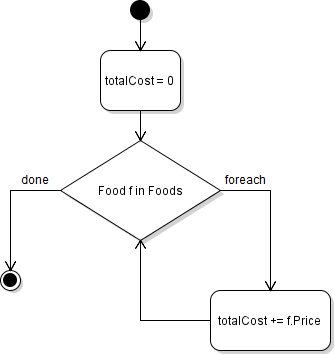
The Decision node shows the foreach loop. The line coming from the right of the Decision represents the foreach loop executing and then executing the code inside of it. The line coming from the left of the Decision represents the foreach loop reaching its "limit" and no longer executing.
For this example we will be creating a foreach Activity Diagram from the code below.
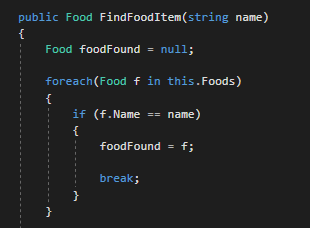
This method defines a local variable of type Food and initializes it. Then it uses a foreach loop to loop through the list of Food objects. When the foreach loop executes, it compares the Name field of the Food object to the name parameter passed in and if it matches, assigns the foodFound variable to the Food object and breaks out of the loop. How to represent this in an Activity Diagram is shown below.
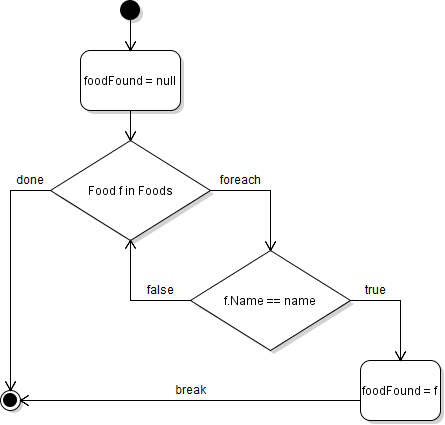
The first Decision node shows the foreach loop. The line to the right of the Decision represents the foreach loop executing and executing the code inside of it. The second Decision node compares represents the if statement in the foreach loop. If true, an Activity is executed and there is a "break" out of the foreach loop and if false the foreach loop executes again.