Build the Diagram in Violet
- Create lifelines
controller : Controllerandselected : Playerin a Violet sequence diagram. - Send
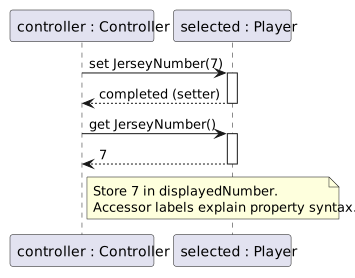
set JerseyNumber(7)from controller to selected and show the setter activation ending before the next request. Its completion carries no value. - Below that exchange, send
get JerseyNumber()from controller to selected. Show its activation and a dashed result7back to the caller. - Add a caller note
Store 7 in displayedNumber. Explain that the accessor labels represent property syntax, not literal C# method names the student must type. - Save and follow the two exchanges in order. Both operate on the same existing Player; neither creates another one.
Compare the Completed Soccer Diagram
Compare this reference with the diagram you built in Violet. Layout may differ; the source meaning, labels, and relevant connections should agree.
- New
- Changed
- Removed
Trace One Interaction from Top to Bottom
Both arrows target selected. The setter changes the backing field; the getter reads the updated value. No new Player is created by either access.