Use using System.Collections.Generic; at the top of the C# file, before its class definitions. Place the following statements inside an existing method. These examples use the established Player class and its public integer field NumberOfTurns.
Player jordan = new Player();
jordan.NumberOfTurns = 2;
List<Player> players = new List<Player>();
players.Add(jordan);
players.Add(jordan);

Player selected = players[0];
selected.NumberOfTurns = 3;
selected and both list entries reach one Jordan. Reading NumberOfTurns through either entry now gives 3. Count is 2, which counts entries rather than distinct objects.
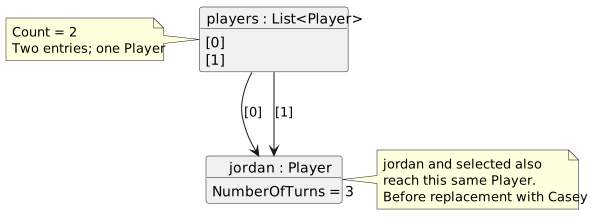
- New
- Changed
- Removed
Player casey = new Player();
casey.NumberOfTurns = 1;
players[0] = casey;
Only index 0 changes to Casey. Index 1 and selected still reach Jordan with turn count 3. Count remains 2. Compare this with changing selected.NumberOfTurns: that changes an object field, not an entry’s reference.
List<Player> samePlayers = players;
samePlayers.RemoveAt(0);
The assignment copies the list reference; it does not create another list. Removing index 0 through samePlayers also changes the list reached through players. Both variables now report Count 1 and their remaining item is Jordan.