2.3.3 Representing 2D Array Fields in Class Diagrams

Representing 2D Array Fields in Class Diagrams

A Wildcats Team can store scores in a rectangular array. Build on the 1D field lesson: the class entry still describes a field type, but one comma now identifies two dimensions.

Read the Field Definition Before Drawing

This complete class fragment declares the field without creating an array. Each Team instance can later receive its own array reference.

A two-dimensional array field
public class Team
{
    public int[,] RoundGoals;
}
Map the Declaration to One Attribute

The field is public, its name is RoundGoals, and its type is int[,]. Translate those three parts into +RoundGoals : int[,]. The comma belongs to the rectangular array type; it is not a separator between two fields.

Build the Diagram in Violet
  1. Create a class diagram and place one class box named Team.
  2. In its attributes compartment enter +RoundGoals : int[,]. Compare the brackets with the 1D int[] type: this entry must retain the comma.
  3. Leave the operations compartment empty. Do not add row indexes, Length, scores, or a fixed 2×3 size to this class box.
  4. Save and read the field as a public reference to a rectangular two-dimensional integer array, rather than one current set of scores.
Compare the Completed Soccer Diagram
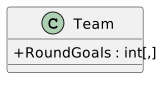
Team defines one public RoundGoals field of rectangular two-dimensional integer array type.
One field contract for rectangular score arrays
  • New
  • Changed
  • Removed

For the matching instance view, use the lesson below.

Change the Element Type