- New
- Changed
- Removed
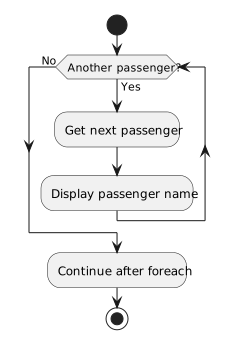
The current passenger is available inside the loop body. After displaying a name, the loop attempts to obtain the next passenger. When no items remain, it continues after the loop. An empty collection takes the exit path immediately and displays no names.
The diagram uses a conceptual next-item question; the foreach syntax performs that retrieval automatically. Do not add an integer counter to the C# example just because the diagram contains a repeat arrow. If the collection has two Passenger objects, the display action runs twice. If it is empty, the No arrow leaves immediately.
Trace a list containing Ana and Bo, then an empty list. The diagram describes iteration conceptually; C# foreach supplies the mechanics of moving to the next item without an explicit index in the code.