Expand the Loop Header
- New
- Changed
- Removed
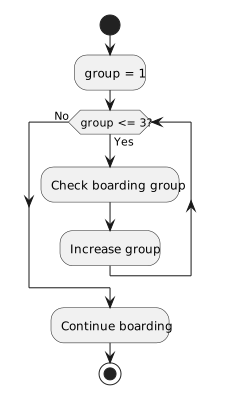
Draw group = 1 once before the decision. The Yes path runs Check boarding group, then increases group and returns to the decision. The No path leaves the loop. The condition is checked for group 4, evaluates false, and takes the exit path.
If the update is drawn after the loop exit, the body can repeat without changing group. The location of the update is essential to the meaning of the diagram.
Trace the Outcome
Follow the arrow back from the increment and label the counter at each condition test: 1, 2, 3, then 4. Check that the exit action is reachable only on the No path.