2.1.7 Representing while Loops in Activity Diagrams

Represent while Loops in an Activity Diagram

Three Wildcats players are waiting for a training turn. Begin with the C# loop, identify what repeats, and draw the arrow that checks the condition again. Then add an early exit as a separate worked extension.

Read the Code Before Drawing

The code below uses the same soccer rule as the C# lesson. Read that lesson if the control statement is unfamiliar.

Source to translate
int waitingPlayers = 3;
int completedTurns = 0;

while (waitingPlayers > 0)
{
    waitingPlayers = waitingPlayers - 1;
    completedTurns = completedTurns + 1;
}
Rewrite the Execution in Ordinary Words
Pseudocode for the same behavior
Set waiting players to 3
Set completed turns to 0
WHILE players are waiting
    Record one fewer waiting player
    Record one more completed turn
    Check whether players are waiting again
Continue after the loop

Pseudocode describes the behavior without requiring C# punctuation. Preserve the order, alternatives, and repetition when you simplify the wording. Draw the actions and questions; braces and semicolons do not become nodes.

Map Code to Nodes and Arrows

The starting assignments become actions before the condition diamond. The two body assignments become actions on the while route. The arrow returning to the condition represents repetition; it must bypass the starting assignments.

Build the Diagram in Violet
  1. Connect the start node to Set waiting to 3, then to Set completed to 0, then to a decision diamond labeled Players waiting?. These starting assignments run once.
  2. Label the route into the body while and the route out done. In this convention, while means the condition is true and done means it is false. The body contains Record one fewer waiting player, followed by Record one more completed turn.
  3. Draw an arrow from the second body action back to Players waiting?. It must bypass both starting assignments. Connect the done route to the final node. Put the final node outside the repeated body.
Compare the Completed Soccer Diagram
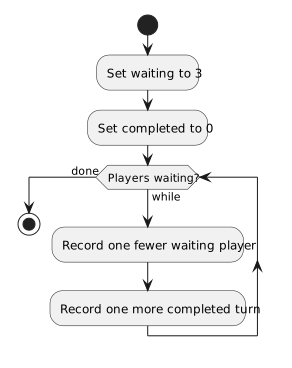
Initialize once, then repeatedly decrease waiting and increase completed while players remain. At zero follow done.
Represent while Loops in an Activity Diagram
  • New
  • Changed
  • Removed
Trace One Route at a Time

Trace the diagram with 3 waiting players. Follow the return arrow after each pair of updates: the waiting count becomes 2, then 1, then 0. At 0, follow done without repeating either body action; the completed count is 3.
Verify the Drawing Against the Code
Predict and Check a Route
Extend the Loop with an Early Exit

Sometimes the drill must stop while players are still waiting. The Boolean input trainingStopped already exists. In this model it stays fixed during one execution. A true value means the coach has stopped training; otherwise players finish all waiting turns.

The statement break; exits the nearest loop immediately, even when its condition is still true. Execution continues after that loop. Here it skips both body updates and goes to the shared completion action. This introduces the early exit needed in the Airline task.

Stop early or finish the waiting count
int waitingPlayers = 3;
int completedTurns = 0;

while (waitingPlayers > 0)
{

    if (trainingStopped)
    {
        break;
    }

    waitingPlayers = waitingPlayers - 1;
    completedTurns = completedTurns + 1;
}

string status = "Training finished";

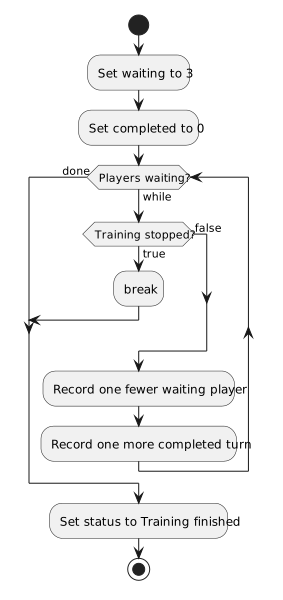
Insert a second diamond labeled Training stopped? on the while route. Its true route goes through an action labeled break to Set status to Training finished. Its false route reaches the two updates and the normal return arrow.

The done route from Players waiting? also reaches Set status to Training finished. Both exits then reach the final node. The break action is an explicit marker for the jump in this exercise; the outgoing arrow is what carries execution outside the loop.

Training stopped true exits through break to the shared status action. Normal completion reaches the same status action.
Both loop exits reach the shared continuation
  • New
  • Changed
  • Removed

Trace both exits. With 3 waiting players and trainingStopped false, all three turns complete before the condition takes the done route. With the same waiting count and trainingStopped true, break leaves immediately and the completed count stays 0. Both routes reach Set status to Training finished.

Now start with 0 waiting players and trainingStopped true. The first loop condition takes done, so the training-stopped check and both updates are skipped. The shared status action still runs.