- New
- Changed
- Removed
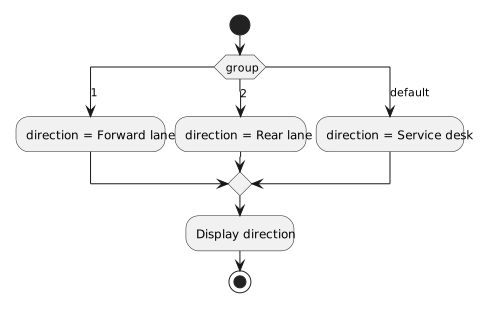
The start node reaches the selector. Exactly one outgoing alternative is taken for a particular group value. Its action stores a direction, and the path rejoins the other alternatives before the direction is displayed.
In a UML editor, the decision and merge may be shown as separate diamonds. What matters is their role: the first chooses a path; the later merge allows any selected path to continue. A merge does not wait for all alternatives to execute.
string direction;
switch (group)
{
    case 1:
        direction = "Forward lane";
        break;
    case 2:
        direction = "Rear lane";
        break;
    default:
        direction = "Service desk";
        break;
}

Console.WriteLine(direction);
The break statements are reflected by paths that leave their selected section and rejoin after the switch. They do not need separate action boxes. Display direction is outside the switch, matching its location after the merge.
Do not draw Forward lane followed by Rear lane on the same path. That would describe two assignments during one selection. Do not return the display action to the selector either: this is one choice, so there is no loop-back edge.
The default path is also meaningful. A diagram that omits it would fail to show the behavior for a group such as 7, even though the code supplies a direction for that value.