The Debugger Shows Objects Through Variables
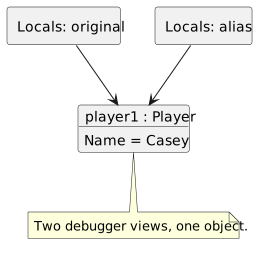
Visual Studio displays a variable and the fields of the object it reaches. Two expanded variables may show the same fields because they lead to one object.
- New
- Changed
- Removed
Visual Studio displays a variable and the fields of the object it reaches. Two expanded variables may show the same fields because they lead to one object.
After these statements execute:
Player alias = original;
alias.Name = "Casey";
Locals displays Name Casey under both `alias` and `original`. The repeated field display provides two views of one Player; it does not show a copied Player.
After `alias = new Player();`, there are two Players. The old Player is still reached by `original`. The new Player is reached by `alias`.
If `alias.Name` then becomes Morgan, Locals shows `original.Name` as Casey and `alias.Name` as Morgan. Those values belong to two different Players.
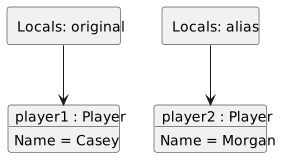
The debugger organizes information for reading; it is not a physical map of memory. The `new` expressions and reference assignments explain how many objects exist and why the displayed fields agree or differ.