The Locals window shows local variables and parameters for the selected call stack frame while paused in the debugger. Expanding this also lets you inspect fields on the active object.
Use a small soccer calculation to connect the visible names to their scope.
Read the example once before trying to explain every line. Then use the short explanations below to connect each part of the code with the soccer task.
public int GetWinPoints(int wins)
{
int points = wins * 3;
return points;
}
public int GetTrainingAward()
{
int award = this.GetWinPoints(2) + 1;
return award;
}Read the table one row at a time. Check when each value is observed: a value before a statement may differ from the value after that statement runs. Cover the result column and predict an answer before checking it.
| Pause point | Selected frame | Value to inspect |
|---|---|---|
| Before multiplication | GetWinPoints | wins is 2 |
| After multiplication | GetWinPoints | points is 6 |
| After caller assignment | GetTrainingAward | award is 7 |
Use the diagram to follow the same soccer example in a different form. Start at the beginning and follow one execution at a time. Compare the labeled actions with the source code; do not assume every action in the picture runs.
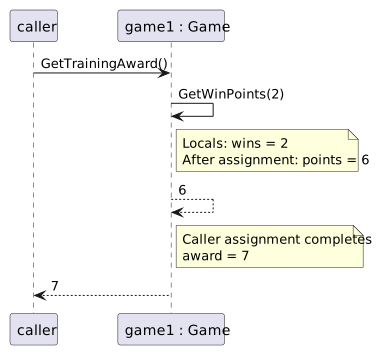
Write your prediction and a short reason first. If you test the change, compare the observed values with that prediction. When they differ, find the first statement or decision where your explanation stops matching the code.