Step Into the Method
Use Step Into at the method call.
When execution moves into:
SetJerseyNumber(int number)inspect:
numberThe debugger should show the value received for this call.
Conceptually:
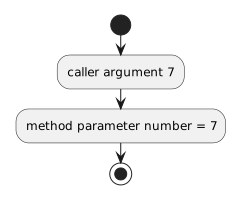
- New
- Changed
- Removed
A parameter gets its value from the argument supplied by the caller.
Consider:
player1.SetJerseyNumber(7);and:
public void SetJerseyNumber(int number)
{
    this.jerseyNumber = number;
}
You can use the debugger to observe the value crossing that method-call boundary.
Set a breakpoint near:
player1.SetJerseyNumber(7);Before entering the method, identify the argument:
7Predict:
Now you have an expected value.
Use Step Into at the method call.
When execution moves into:
SetJerseyNumber(int number)inspect:
numberThe debugger should show the value received for this call.
Conceptually:
The argument does not have to be a literal.
Suppose:
int selectedNumber = 9;
player1.SetJerseyNumber(selectedNumber);
Before the call, inspect:
selectedNumber = 9Then step into the method.
Inside, inspect:
number = 9The names differ.
The value passed from caller to parameter is the connection.
Suppose:
player1.SetPlayerInfo("Jordan", 7);and:
public void SetPlayerInfo(string name, int number)
{
    this.name = name;
    this.jerseyNumber = number;
}
Predict:
name = "Jordan"
number = 7
After stepping into the method, inspect both parameters.
The debugger should show the values associated with that specific call.
For:
player1.SetAvailability(false);and:
public void SetAvailability(bool available)
{
    if (!available)
    {
        System.Console.WriteLine("Unavailable");
    }
}
inside the method, inspect:
available = falseThen evaluate:
!availableas:
!false → trueParameter tracing and Boolean-expression tracing work together.
Suppose the method is called twice:
player1.SetJerseyNumber(7);
player1.SetJerseyNumber(12);
The parameter value depends on which call is currently active.
First call:
number = 7Second call:
number = 12Do not assume a parameter has one permanent value.
It receives a value for each method invocation.
While paused inside a parameterized method, the Call Stack can help answer:
This is useful when the same method can be called from several locations.
Combine:
Together they explain the runtime path.
Suppose:
public void SendTeamMessage(string message)
{
    this.team.DisplayMessage(message);
}
and the caller uses:
player1.SendTeamMessage("Practice starts at 5.");Inside SendTeamMessage, inspect:
message = "Practice starts at 5."Then step into:
this.team.DisplayMessage(message);Inside the Team method, inspect its parameter.
You can observe the same text value being forwarded across another method-call boundary.
Inside:
public void SetJerseyNumber(int number)
{
    this.jerseyNumber = number;
}
the debugger may show:
number = 7
this.jerseyNumber = 0
before the assignment executes.
After stepping over the assignment:
number = 7
this.jerseyNumber = 7
The parameter value existed first.
The field changed when the assignment executed.
This makes the difference between method input and object state visible.
Suppose the debugger confirms:
number = 7but the wrong field is assigned:
this.score = number;The argument and parameter flow are correct.
The defect is in how the method uses the parameter.
Tracing lets you isolate the part that is actually wrong.
A strong explanation can be:
That explanation connects:
Use this sequence:
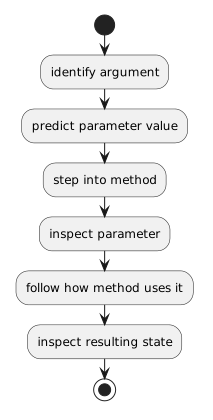
This gives you direct runtime evidence for how information moves into a method.