1.3.15 Translating Sequence Diagrams Into C#

A Sequence Diagram Gives You an Ordered Call Plan

A UML sequence diagram shows:

That makes it a useful guide for C# method-call structure.

Consider this conceptual interaction:
Plain text
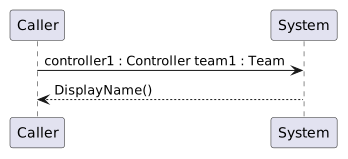
controller1 : Controller      team1 : Team

         DisplayName()
------------------------------>

The message says:

controller1 calls DisplayName() on team1.

Translate the Receiver First

The message ends at:

Plain text
team1 : Team

That means the C# call needs to target team1.

A basic call is:

C#
team1.DisplayName();

The receiver in the diagram becomes the object reference before the dot in C#.

Translate the Message Name into the Method Call

The diagram message:

Plain text
DisplayName()

maps to the C# method name and parentheses:

C#
DisplayName()

Together:

C#
team1.DisplayName();

The sequence diagram and C# now describe the same call.

Translate Calls in Vertical Order

Suppose the diagram shows:

Plain text
ResetScore()
DisplayName()

in that order from top to bottom.

The C# call sequence should preserve the same order:

C#
team1.ResetScore();
team1.DisplayName();

Changing the order changes the interaction.

Nested Calls Belong Inside the Method that Sends Them

Suppose the sequence diagram shows:

Plain text
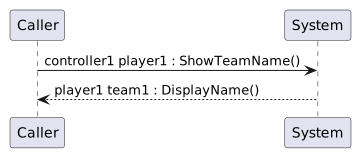
controller1 → player1 : ShowTeamName()
player1     → team1   : DisplayName()

This does not mean both calls must appear next to each other in one method.

The diagram tells you that the second call occurs while the Player method is executing.

A conceptual C# structure can be:

C#
class Player
{
    public Team team;

    public void ShowTeamName()
    {
        this.team.DisplayName();
    }
}

and the original caller can contain:

C#
player1.ShowTeamName();

The nested placement preserves the interaction.

Match Calls to Methods that Already Exist in the Design

If the sequence diagram contains:

Plain text
DisplayName()

the receiving class should define that method.

A simple class diagram may already show:

Plain text
Team
-------------------------
DisplayName() : void

The class diagram defines that Team has the method.

The sequence diagram shows a particular call.

The C# implements the behavior and call.

Do Not Add Parameters That the Diagram Does Not Show

Module 1.3 uses parameterless calls.

So:

Plain text
DisplayName()

maps naturally to:

C#
team1.DisplayName();

Do not invent:

C#
team1.DisplayName("Wildcats");

Parameters and arguments begin in Module 1.4.

Do Not Invent Return Assignments

The current methods return void.

This sequence-diagram message:

Plain text
DisplayName()

should not become:

C#
string result = team1.DisplayName();

unless the method has a return type taught and required later.

Compare the Finished Source Back to the Diagram

For every message, verify:

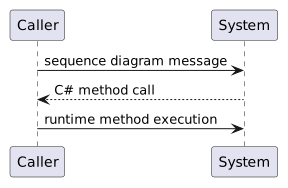
A useful trace is:

Plain text
sequence diagram message
      ↓
C# method call
      ↓
runtime method execution

The debugger provides the third view.

Translation Means Preserving the Interaction

The goal is not line-for-line conversion of drawing geometry.

The goal is to preserve:

who calls whom, which method is called, and when it happens.

That is the common meaning shared by the UML sequence diagram and the C# source.