1.3.14 Resolving Feedback System Sequence Diagram Errors

Feedback Identifies a Difference in the Interaction Model

A sequence diagram should communicate:

When the Feedback System reports a sequence-diagram error, treat the message as evidence that one of those elements differs from the expected interaction.

Identify the Error Category First

Common introductory sequence-diagram problems include:

Class-diagram field errors and object-diagram value errors belong to different UML forms.

Compare the Message Receiver

Suppose the expected interaction is:
Plain text
player1 : Player ── DisplayName() ──> team1 : Team

but the diagram sends:

Plain text
DisplayName()

back to player1.

The method name may be correct.

The receiver is wrong.

The diagram must show the object whose method actually executes.

Check Message Order

Suppose the source interaction is:

C#
team1.ResetScore();
team1.DisplayName();

The sequence diagram should show:

Plain text
ResetScore()

before:

Plain text
DisplayName()

because vertical position represents time.

Correct messages in the wrong order still describe the wrong interaction.

Keep Participant Identity and Type Separate

A participant may be labeled conceptually as:

Plain text
team1 : Team

where:

Plain text
team1

is the object identity and:

Plain text
Team

is the type.

Do not replace the current object identity with only the class name when the interaction requires a specific object instance.

Do Not Add Parameters or Returned Values Early

The current Module 1.3 sequence diagrams focus on parameterless void methods.

If a feedback message seems confusing, do not solve it by adding:

Those concepts belong to later modules.

Stay inside the current teaching boundary.

Preserve Correct Parts of the Diagram

If three messages are correct and one receiver is wrong, keep the three correct interactions.

Make a focused correction.

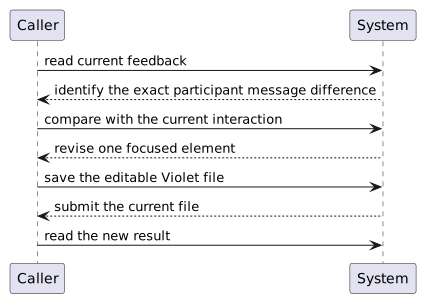
A useful workflow is:

Plain text
read current feedback
      ↓
identify the exact participant/message difference
      ↓
compare with the current interaction
      ↓
revise one focused element
      ↓
save the editable Violet file
      ↓
submit the current file
      ↓
read the new result

Do Not Guess from Visual Symmetry

A sequence diagram is not correct because the arrows look balanced or evenly spaced.

Meaning comes from:

Model the source interaction rather than arranging arrows for appearance.

Read the Revised Diagram as a Story

For example:

player1 receives ShowTeamName(). While that method is active, player1 calls DisplayName() on team1.

If the diagram cannot support that sentence, the interaction is still unclear.

Feedback Should Lead to a Better Model

The goal is not only to remove the Feedback System error.

The goal is to make the diagram accurately represent the required method-call interaction.