1.2.17 Resolving Feedback System Class Diagram Errors

Read the Feedback as a Difference Between the Model and the Requirement

When the Feedback System reports a class-diagram issue, first identify which structural category is involved.

Common introductory categories include:

Compare One Structural Element at a Time

If the feedback identifies a field issue, compare:
Plain text
class
field name
field type
visibility

Do not redraw the entire diagram because one field is incorrect.

Preserve Correct Parts of the Model

Suppose Player is correct but Team is missing one field.

Keep the correct Player design.

Make the smallest change needed to repair Team.

Focused changes make the new feedback easier to interpret.

Do Not Add Future UML Features

A class-diagram error at this stage should not require:

If a proposed correction depends on an untaught concept, return to the current requirement.

Save the Editable Violet File Before Resubmitting

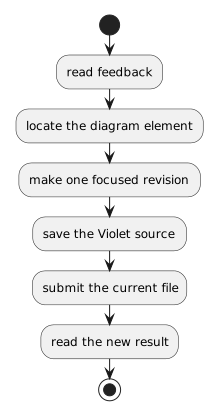
A useful revision cycle is:

Plain text
read feedback
    ↓
locate the diagram element
    ↓
make one focused revision
    ↓
save the Violet source
    ↓
submit the current file
    ↓
read the new result

Use the newest feedback as evidence about the newest diagram.

The Goal Is Correct Structure

The goal is not merely to make a message disappear.

The goal is for the class diagram to represent the required classes, fields, types, visibility, and relationships accurately.