Read the Class Declaration from Left to Right
Consider:
public class Player
{
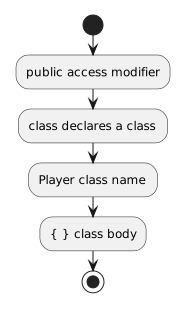
}The important parts are:
- New
- Changed
- Removed
The class body is where the class's fields and later its methods are defined.
Earlier, you worked with objects and learned that a class describes the structure shared by objects of the same kind.
In C#, you define that structure with a class declaration.
For example:
public class Player
{
}This tells C# that the program has a class named Player.
Consider:
public class Player
{
}The important parts are:
The class body is where the class's fields and later its methods are defined.
Class names should communicate what kind of object the class represents.
Soccer examples might include:
Player
Team
Match
Ball
Each name represents one general kind of thing rather than one particular object.
For example, Player is the class name. A later object such as player1 is one instance of that class.
In the course examples, class names use PascalCase.
That means each word begins with an uppercase letter:
Player
SoccerBall
MatchOfficial
A name such as:
soccerBalldoes not follow that class-name convention.
An empty class is valid as a starting point:
public class Player
{
}
But an empty class does not yet describe much about a soccer player.
As the design develops, fields are added inside the braces so Player objects can store the information required by the model.
The next page focuses specifically on defining those fields.
You define the class once:
public class Player
{
}
Later, the program can create multiple Player objects from that same class design.
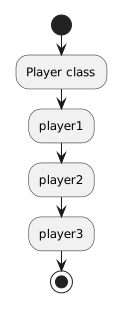
The class defines the shared structure. Each object has its own identity and state.
When the course asks you to define a class, create the class that matches the current design and keep the source organized around that class.
For example, a file named:
Player.csshould contain the Player class used by the current solution.
This makes the source easier to navigate and keeps the class name, file name, and model easy to connect.
When a comment is required, use it to clarify why a class exists or what role it plays.
A weak comment merely repeats the code:
// This is the Player class.
public class Player
{
}
A more useful comment would explain the class's role in the current program:
// Represents a soccer player tracked by the application.
public class Player
{
}
Comments should add meaning rather than narrate syntax that is already obvious.
A UML class diagram might identify a class named:
PlayerThe C# class declaration should use the same intended class identity:
public class Player
{
}
The UML model communicates the design. The C# source defines that design in executable source code.
For now, the essential class-definition pattern is:
public class ClassName
{
}
When you read or write one, ask: