1.1.10 How to Map Fields From UML Object Diagrams to C#

After the Object Exists, Its UML Values Can Guide the C# State

Suppose the UML object diagram shows:
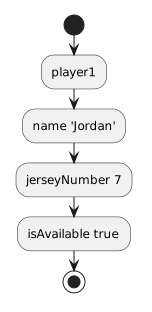
Plain text
player1 : Player
-------------------------
name = "Jordan"
jerseyNumber = 7
isAvailable = true

The object header tells you which instance exists.

The rows beneath it describe the selected field values for that instance.

Your C# code needs to establish the same intended state using the fields available on the supplied class.

Map One UML Field at a Time

Start with:

Plain text
name = "Jordan"

Identify:

Then inspect the supplied C# Player class to confirm that a compatible name field exists.

A basic assignment can then establish that state on player1.

Conceptually:

C#
player1.name = "Jordan";

The source connects the value to the specific Player object.

Continue With the Remaining Supported Fields

For:

Plain text
jerseyNumber = 7

the corresponding assignment is conceptually:

C#
player1.jerseyNumber = 7;

For:

Plain text
isAvailable = true

the corresponding assignment is conceptually:

C#
player1.isAvailable = true;

Together, the statements move the runtime object toward the state shown in the UML snapshot.

Check the Field Type Before Choosing the C# Literal

The UML value:

Plain text
"Jordan"

is text.

The field should use a compatible text type.

The UML value:

Plain text
7

is a whole number.

The field should use a compatible numeric type.

The UML value:

Plain text
true

is Boolean.

The field should use a compatible Boolean type.

Do not turn every UML value into a quoted string.

Preserve the information type.

Map Values to the Correct Object

Suppose the diagram contains:

Plain text
player1 : Player
name = "Jordan"

and:

Plain text
player2 : Player
name = "Casey"

The code must preserve which value belongs to which object.

Conceptually:

C#
player1.name = "Jordan";
player2.name = "Casey";

If those assignments are reversed, all the values still look valid individually.

The runtime model is still wrong.

Object identity and field value need to stay connected.

Do Not Assign Fields That Are Not in the Current Model

Suppose the Player class also has:

Plain text
height

but the current UML does not include a height value.

Do not invent:

C#
player1.height = 1.82;

merely because the field exists in the class.

The UML snapshot and current requirement determine which state you are expected to establish.

Do Not Ignore Required UML Values Because C# Has Defaults

A newly instantiated object may begin with default values.

That does not mean the object already matches the UML.

If the UML requires:

Plain text
jerseyNumber = 7

you need the runtime object to reach that state.

A default numeric value does not satisfy a different required value.

Field Mapping Is About State, Not Only Syntax

A statement such as:

C#
player1.jerseyNumber = 7;

has two important meanings.

Source meaning

Assign the value 7 to the jerseyNumber field associated with player1.

Model meaning

Make the runtime state correspond to:

Plain text
player1 : Player
jerseyNumber = 7

The second meaning is why the statement belongs in the code.

Build a Field-Mapping Plan

For one object, a mapping table can help:

UML field UML value C# field type Intended C# value
name "Jordan" string "Jordan"
jerseyNumber 7 int 7
isAvailable true bool true

Use the actual fields and types from the supplied project.

The table helps separate:

Compare the Runtime Object With the Diagram

After the assignments execute, the debugger can show the current runtime state.

Now compare:

UML

Plain text
player1 : Player
name = "Jordan"
jerseyNumber = 7
isAvailable = true

Runtime state

Plain text
player1
name → "Jordan"
jerseyNumber → 7
isAvailable → true

The debugger gives evidence about whether the code produced the state the diagram describes.

Preserve the Translation Chain

For each field, keep this chain clear:
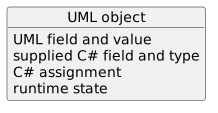
Plain text
UML object
    ↓
UML field and value
    ↓
supplied C# field and type
    ↓
C# assignment
    ↓
runtime state

If something does not match, identify which link in the chain is wrong instead of changing unrelated code.