An Assignment Must Use a Value That Fits the Field
A supplied class can contain fields with different types.
Conceptually, a Player type might include:
string name;
int jerseyNumber;
bool isAvailable;
Those declarations tell you what kind of information each field is designed to hold.
Before assigning a value, identify the field's type.
Then choose a compatible value.
Read the Field Declaration
Suppose the supplied source contains:
The field type is:
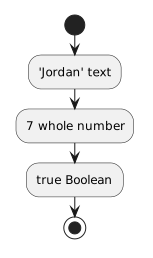 JordanText.
The supplied class should contain compatible field types for the model.
The UML gives you the intended state.
The C# field declaration tells you the type expected by the source.
Quotation Marks Matter
Compare:
with:
The first is text.
The second is a numeric value.
If the field is:
then:
matches the intended whole-number type more directly than:
Do not choose quotation marks based on how the value looks.
Choose the representation based on the field type.
Boolean Values Are Not Quoted Text
For:
the Boolean literal is:
not:
The quoted version is a string.
This difference is easy to miss because both are readable words.
C# treats them as different kinds of values.
Use the Supplied Class as the Type Authority
When working in an existing project, do not guess a field's type from its name.
A field called:
could be represented in several ways depending on the program.
Inspect the supplied declaration.
The code tells you the actual C# type expected by that class.
Do Not Redefine the Class to Make an Assignment Easier
Suppose the supplied field is:
and you accidentally try to use text.
The solution is not automatically to change the field into:
The class design may be part of the required source.
Correct the value to match the intended type unless the task explicitly requires a class-design change.
The Compiler Can Reveal Type Mismatches
If you assign an incompatible value, C# may report a compiler error.
Treat the message as evidence.
Ask:
- What type does the field expect?
- What type is the value I supplied?
- What does the requirement or UML say the value should represent?
Then make a focused correction.
Do Not Introduce Conversion Without a Reason
Later programming work may convert values between representations.
At this point, prefer a value that naturally matches the supplied field type.
If the model says:
and the field is int, use the whole-number value.
Do not convert from text merely to make the example more complicated.
The Main Mapping
For the basic types already available from FIT:
UML / information       C# type
--------------------------------
text                     string
whole number             int
fractional number        double
true/false               bool
The exact supplied class controls the actual type used in the project.
Your job is to recognize that type and assign information that fits it.