0.4.9 UML Class Diagrams

A Class Diagram Describes Kinds of Objects

You have already used UML object diagrams.

An object diagram shows specific instances.

For example:
Plain text
player1 : Player
player2 : Player

Those are two particular Player objects.

A UML class diagram answers a different question:

What kind of object is a Player, and what information should Player objects be able to contain?

Instead of showing player1 and player2, a class diagram can show the Player class itself.

Class Versus Object

Compare these two ideas.

Object instance

Plain text
player1 : Player
-------------------------
name = "Jordan"
jerseyNumber = 7

This shows one specific object and its current values.

Class

Plain text
Player
-------------------------
name
jerseyNumber

This describes the kind of information Player objects can have.

The class is not one particular soccer player.

It is the model for a category of objects.

A Class Diagram Shows Structure

A class diagram can represent:

At this stage, focus on structure rather than behavior.

For a simple soccer system, a class model might include:

Plain text
Player
Team
Match

These are kinds of things the software may need to represent.

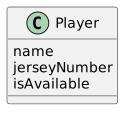
The Class Name Appears at the Top

A class box begins with the class name.

Conceptually:

Plain text
+----------------------+
| Player               |
+----------------------+
| name                 |
| jerseyNumber         |
| isAvailable          |
+----------------------+

The upper section identifies the class.

The attribute section identifies selected information objects of that class can contain.

Later programming courses will add more class-diagram detail.

For now, the important distinction is:

class name → kind of object

attributes → information that kind of object can store

Class Diagrams Do Not Show Current Instance Values

An object diagram might say:

Plain text
name = "Jordan"
jerseyNumber = 7

A class diagram usually describes the attribute itself rather than one current object's value.

For example:

Plain text
name
jerseyNumber

The class says Player objects can have a name and jersey number.

It does not say that every Player object is Jordan or wears number 7.

One Class Can Describe Many Objects

If the class is:

Plain text
Player

the program could later contain many Player objects:

Plain text
player1 : Player
player2 : Player
player3 : Player

The class defines the shared structural idea.

The objects are the specific instances.

This is one of the most important reasons class models are useful.

They let a designer describe the common structure once.

Relationships Can Exist Between Classes

A soccer model may contain:

Plain text
Player
Team
Match

A class diagram can show that Player and Team are related.

Conceptually:

Plain text
Player -------- Team

This means Player objects and Team objects participate in some modeled relationship.

At this stage, the important idea is not advanced relationship notation.

It is that the class diagram describes which kinds of objects can be related, rather than showing only one specific pair of current objects.

A Class Diagram Is Still an Abstraction

A real soccer player has many characteristics.

The software may need only:

The Player class diagram should include the attributes required by the model's purpose.

It should not become a catalog of everything that could possibly be known about a person.

The same abstraction decisions you used for object diagrams still apply.

Read a Class Diagram as a Definition

When you see:

Plain text
Player
-------------------------
name
jerseyNumber
isAvailable

read it as:

A Player is a kind of object that can contain a name, jersey number, and availability value.

When another class appears:

Plain text
Team
-------------------------
name

read it as:

A Team is a kind of object that can contain a name.

The relationship between the classes can then communicate that players can be associated with teams.

Object and Class Diagrams Work Together

A class diagram might define:

Plain text
Player
-------------------------
name
jerseyNumber

An object diagram might later show:

Plain text
player1 : Player
-------------------------
name = "Jordan"
jerseyNumber = 7

The class diagram describes the type.

The object diagram shows one instance.

That connection becomes even more useful when the class attributes also include data types.