0.3.3 Sequence: What Happens Next?

Programs Execute Actions in an Order

A sequence is an ordered series of actions.

In a simple program, one statement executes and then the next statement follows.

Consider this soccer sequence:

  1. Select the current team.
  2. Select the current match.
  3. Load the roster.
  4. Display the players.

Each action prepares information needed by the actions that follow.

If you change the order, the result may change or stop making sense.

The Same Steps in a Different Order Can Produce a Different Result

Suppose the program needs to display the roster for Saturday's match.

This sequence makes sense:

  1. Identify Saturday's match.
  2. Identify the team playing in that match.
  3. Load that team's roster.
  4. Display the roster.

Now rearrange the steps:

  1. Display the roster.
  2. Identify Saturday's match.
  3. Identify the team.
  4. Load the roster.

The first instruction now asks the program to display information before the program has established which roster it needs.

The steps did not disappear.

Their order changed.

That is enough to create a problem.

State Changes Build on Earlier State

You have already seen objects whose values change.

Imagine:
Plain text
player1 : Player
name = "Jordan"
isAvailable = false

A program might perform these actions:

  1. Load player1.
  2. Set isAvailable to true.
  3. Display the player's availability.

The display in step 3 depends on the state produced by step 2.

If the display occurs first, the user may see the old value.

This is why sequence is closely connected to state.

A program's current state reflects instructions that have already executed.

Source Code Gives You a Written Sequence

A short C# block may contain:

C#
Player player1 = new Player();
player1.name = "Jordan";
player1.jerseyNumber = 7;

Read from top to bottom:

  1. create the Player object;
  2. assign the name;
  3. assign the jersey number.

At this stage, that is the basic execution model to keep in mind.

Later you will encounter decisions that can cause the program to follow different paths.

Before that happens, become comfortable tracing a straight sequence.

Predict Before You Observe

Suppose the code is:

C#
Player player1 = new Player();

player1.jerseyNumber = 7;
player1.jerseyNumber = 9;

What value should the field contain after both assignments execute?

The second assignment happens after the first.

So the later state should reflect:

jerseyNumber = 9

This kind of prediction is useful because you can compare it with the debugger.

If the observed value differs from the predicted value, you have evidence that your understanding of the execution path is incomplete.

A Debugger Pause Divides “Already Happened” From “Not Yet Happened”

When Visual Studio pauses at a breakpoint, the current location helps you reason about sequence.

Some statements have already executed.

Other statements have not.

Suppose the program pauses immediately before:

C#
player1.jerseyNumber = 7;

The value 7 has not been assigned by that statement yet.

After the statement executes, the object's state can change.

This is one reason debugger observation is useful: it lets you connect program state to a precise point in the sequence.

Dependencies Tell You Why the Order Matters

Not every pair of instructions depends on one another.

But when one step needs information created by another, order becomes essential.

For example:

Step A: Create player1.

Step B: Assign player1.name.

Step B depends on Step A because the program needs a Player object before it can assign a field on that object.

A useful question while tracing code is:

What does this statement need to already exist or already be true?

That question helps reveal dependencies in the sequence.

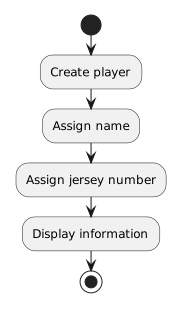
Program Flow Is a Path Through Instructions

For a straight sequence, program flow is easy to picture:

Plain text
Create player
      ↓
Assign name
      ↓
Assign jersey number
      ↓
Display information

The arrows communicate:

After this action, continue to the next action.

This simple visual idea leads into flowcharts and UML activity diagrams.

Later, the path can split when a program makes a decision.

For now, focus on a single path from one action to the next.

Sequence Also Matters Outside of Code

The same reasoning appears in technical processes.

For example:

  1. Edit the source.
  2. Save the source.
  3. Build the solution.
  4. Run the application.
  5. Observe the result.

Running before saving may execute an older version.

Submitting before saving may send an older file.

Sequence affects technical work even when the steps are not C# statements.

Read a Sequence as a Story of State

When tracing instructions, keep asking:

Those questions turn a list of statements into a story of how the program changes over time.

That is the foundation for understanding program flow.