Acceptance criteria
- The solution has a console front end with the required command-processing loop.
You will select the Console App (.NET Framework) as seen in the image below.
4.2.1 How to Create a Console Application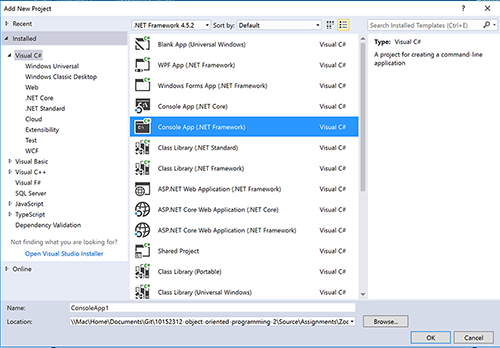
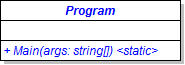
Console.WriteLine("Welcome to the Como Zoo!");Console.Title = "Object-Oriented Programming 2: Zoo";Leave the body of the loop empty.
A console window with the text "Welcome to Como Zoo!" and a blinking cursor should appear. Typing should not work.
Console.Write("] ")switch (command)
{
}
Include the bad command in your warning.
Your message with the command should appear and the application should reset to the prompt.
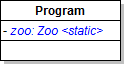
A new Como Zoo has been created.
The output should be exactly as seen below:
Known commands:
HELP: Shows a list of known commands.
EXIT: Exits the application.
NEW: Creates the ComoZoo.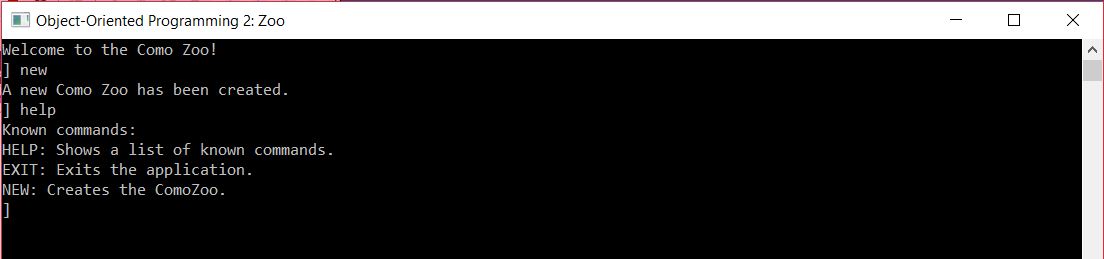
Nothing should happen. Type help. The "help" command should run.
command = command.ToLower();The ToLower and Trim methods can be chained (i.e. named one after the other on the same line), as shown in the code below:
command.ToLower().Trim();© 2026 Northcentral Technical College