Currently if you wanted to instantiate an Animal, Mammal, or Bird you could even though these things are only ideas and not actual things.
Under Construction
This page is currently being built. Please check back soon.
This page is currently being built. Please check back soon.
Work through the user stories in order. Each story states the goal and acceptance criteria; its nested tasks retain the detailed implementation and verification steps.
Check the result against this instruction: Copy your 3.2 ending code, renaming both the folder and the Visual Studio solution file
Currently if you wanted to instantiate an Animal, Mammal, or Bird you could even though these things are only ideas and not actual things.
You will make the classes abstract so that none of them can be instantiated.
This focused design shows the members or flow relevant to this feature. Keep unchanged members from your preceding checkpoint; follow the tasks below for the order of intermediate edits.
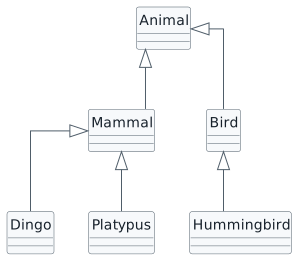
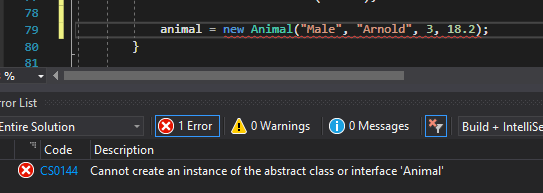
public abstract class AnimalCheck the result against this instruction: In the Animal class, make the class abstract by adding the abstract keyword in the class header.
Check the result against this instruction: Make the Bird and Mammal classes abstract.
Currently a hummingbird could feed their newborn milk, which goes against the laws of nature.
You will move the methods and related fields for feeding a newborn with milk out of the animal class and into the mammal class.
This focused design shows the members or flow relevant to this feature. Keep unchanged members from your preceding checkpoint; follow the tasks below for the order of intermediate edits.
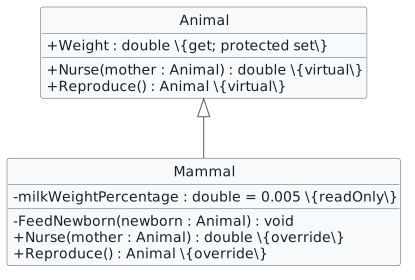
Check the result against this instruction: Cut the FeedNewborn method from the Animal class and paste it inside the Mammal class.
Check the result against this instruction: Cut the milkWeightPercentage from the Animal class and paste it in the Mammal class.
Check the result against this instruction: In the Animal class, modify the Reproduce method to make it virtual and add an override Reproduce method in the Mammal class.
if (this.GetType() != typeof(Platypus))
{
    this.FeedNewborn(baby);
}public double Weight
{
get
{
return this.weight;
}
protected set
{
this.weight = value;
}
}animal.Weight = 200;Birds and Mammals have two different baby weight percentages, but are currently the same. However, if we move the readonly fields for the weight gain percentage to the Bird and Mammal classes, the Animal class that uses the percent loses access to it.
You will move the baby weight percentage fields to their respective classes and define a property in the Animal class that can get and assign those values.
This focused design shows the members or flow relevant to this feature. Keep unchanged members from your preceding checkpoint; follow the tasks below for the order of intermediate edits.
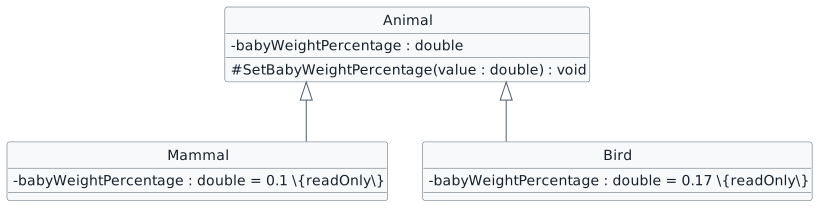
Check the result against this instruction: In the Mammal class, define a field named babyWeightPercentage of type double with a readonly value of 0.1
Check the result against this instruction: In the Bird class, define a field named babyWeightPercentage of type double with a readonly value of 0.17
Check the result against this instruction: In the Animal class, modify the babyWeightPercentage field so that it's assignable and add a method named SetBabyWeightPercentage that takes a double. In the SetBabyWeightPercentage method, assign the babyWeightPercentage field to the value passed in.
Check the result against this instruction: In the Mammal and Bird constructors, call the SetBabyWeightPercentage method and pass in the read only babyWeightPercentage fields.
Currently if a class that inherits from animal doesn't have an EatWeightGainPercentage property, the property in the Animal class returns 0.0, but that is never going to be true for an animal.
You will make the EatWeightGainPercentage abstract instead of virtual to ensure that the descendant class has that property.
This focused design shows the members or flow relevant to this feature. Keep unchanged members from your preceding checkpoint; follow the tasks below for the order of intermediate edits.
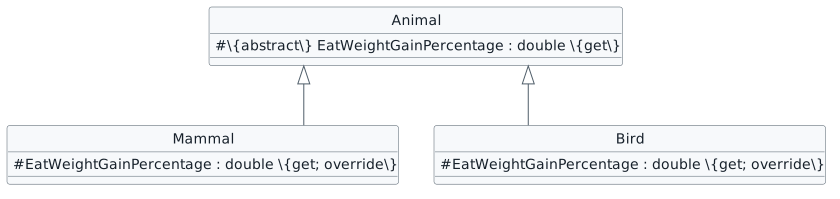
Check the result against this instruction: In the Mammal and Bird classes, modify the EatWeightGainPercentage property so that they are protected.
protected abstract double EatWeightGainPercentage { get; }
Currently all animals lose weight when they move based on the same weight loss percentage, but animals move in different ways and lose weight in different ways.
You will make the Move method abstract and ensure that all animals lose weight when they move based on what they are.
This focused design shows the members or flow relevant to this feature. Keep unchanged members from your preceding checkpoint; follow the tasks below for the order of intermediate edits.
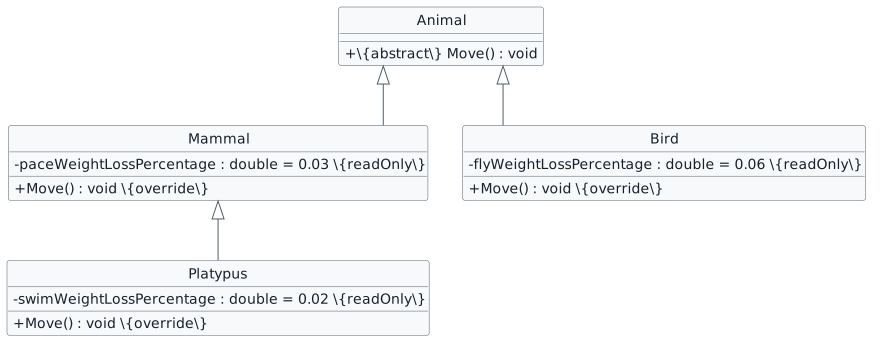
| Implementation | Percentage | Base Move call |
|---|---|---|
| Mammal.Move | 0.03 | None: Animal.Move is abstract |
| Platypus.Move | 0.02 | None: do not also apply mammal pacing |
| Bird.Move | 0.06 | None: Animal.Move is abstract |
Check the result against this instruction: Remove and define fields using this story’s design reference.
public abstract void Move();Check the result against this instruction: To make the Move method abstract, remove the method body and replace the method header with this:
We do not call base in this method because the Mammal class does not have anything to add to the Platypus swimming. Ensure there is no call to base in this method.
Ensure that Weight is 2.910
When we debug and look at what an object is, a quick glace won't tell you much.
We will add an override the ToString method to show us information we want in the Autos window.
This focused design shows the members or flow relevant to this feature. Keep unchanged members from your preceding checkpoint; follow the tasks below for the order of intermediate edits.

Check the result against this instruction: Ensure that only the Animal class and its descendants can use the HappinessLevel property by making it protected.
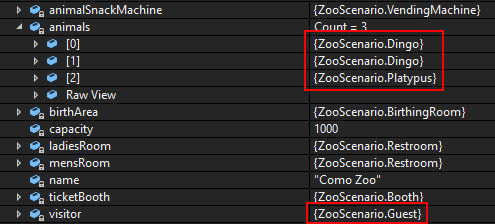
Check the result against this instruction: Add overrides to both the Guest and Animal classes.
return this.name + " " + this.GetType().Name + " " + this.HappinessLevel + " " + this.Weight;Check the result against this instruction: In the ToString method in the Animal class, paste the following code:
return this.name + " " + this.age + " " + this.MoneyBalance;Check the result against this instruction: In the ToString method in the Guest class, paste the following code:
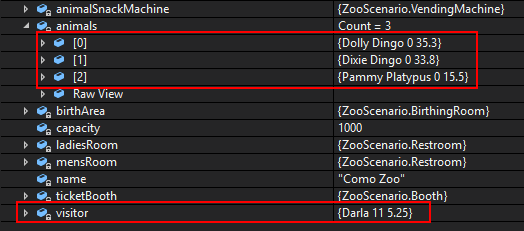
Check the result against this instruction: Ensure that all code is StyleCop compliant.
Check the result against this instruction: Zip the solution and submit to the Feedback System
Check the result against this instruction: Submit the Feedback System url to the correct assignment in Canvas.
Return to each user story and confirm that you can demonstrate its acceptance criteria. Use the task checkboxes to track completion; a checked box is not a substitute for testing or inspecting the required evidence.
Prevent construction of incomplete animal categories Keep nursing behavior with mammals Use category-specific newborn weight percentages Require an eating-percentage implementation Move each animal using its own rule Identify animals and guests in the debuggerRemove temporary lines used only to demonstrate compile-time errors. Build without errors or warnings, check StyleCop compliance, and rerun the required scenario paths.
Use the submission or attendance instructions in this page. For a Feedback System submission, upload the requested ZIP, review and resolve the feedback, and submit the resulting URL to the matching Canvas activity. For a Canvas quiz, enter only the requested answers; for an oral final, complete the scheduling and attendance steps.