 Introduction To Programming
 10-152-310
Learning Plan 3 : Math and Operators
The Issue
JavaScript is not very good about telling us something is wrong. Look at this demo to see what I mean: Demo: What's Wrong?
Enabling Inspection
There are multiple ways to enable the Firefox Firebug inspection tool. The first step is to get the Firebug add-on by visiting the following url: https://getfirebug.com/.
Make sure you install the appropriate version for your level of Firefox.
There are several ways to turn on Firebug:
-
Right click the page and select "Inspect Element with Firebug".

Inspect with Firebug Ensure that your console is enabled as this is the panel that reveals your JavaScript errors.
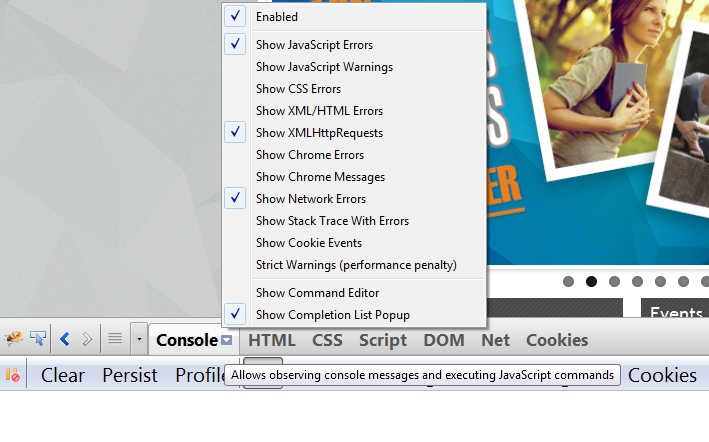
Inspect with Firebug - On the latest release of Firefox (29.01), you can add a button to the drop down menu using the customize feature.
Firefox comes with a built in inspection tool. There are two ways to open it.
-
Right click the page and select "Inspect Element".

Inspect with Firefox Ensure that your console is enabled as this is the panel that reveals your JavaScript errors.

Inspect with Firefox -
Utilize the Firefox menu to turn on Developer Tools
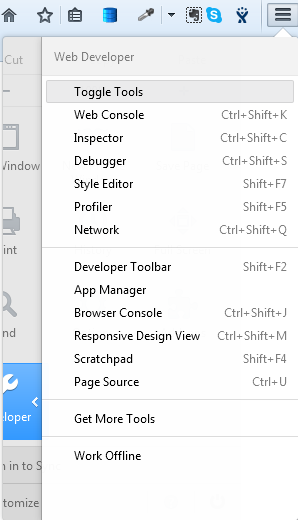
Inspect with Firefox Menu
Chrome comes with a built in inspection tool. There are two ways to open it.
-
Right click the page and select "Inspect Element".

Inspect with Chrome Ensure that your console is enabled as this is the panel that reveals your JavaScript errors.

Inspect with Chrome -
Utilize the Chrome menu to turn on Developer Tools
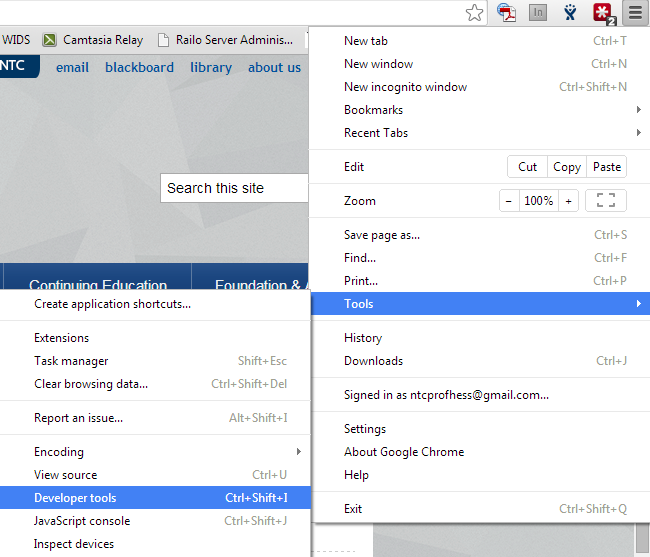
Inspect with Chrome Menu