 Introduction To Programming
 10-152-310
Learning Plan 2 : Variables and Data Types
Number Variables
- The number data type in JavaScript holds, well, numbers. We can count with them, have them be prices, add them together, divide them, etc. These are all numbers:
    4
    1.50
    -14
    1000000
    5e10
- Numbers can be big or small, positive or negative, have decimals or not. In JavaScript they are all just numbers. There aren't different data types for different kinds of numbers.
- How do we make a variable that's a number?
- That's easy, just declare a variable and put a number in it. Just make sure you type the number with no quotes around it.
- We don't have to tell JavaScript that the variable is a number? Nope.
- Here's a demo of numbers: Demo: Number Variables
Converting Strings to a Number
- When a user is asked to enter a number in a
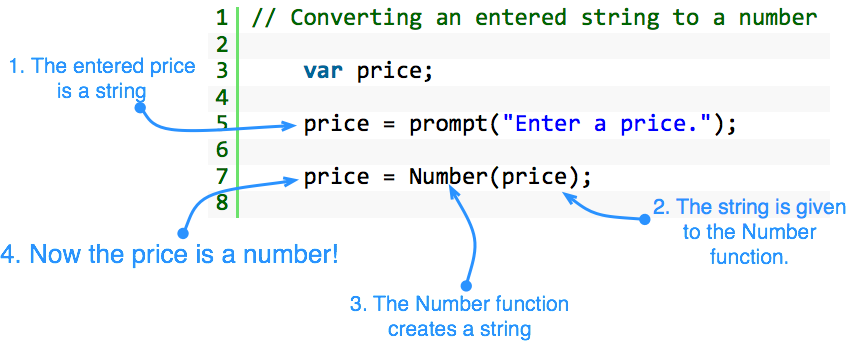
promptdialog, what data type comes into your program? - Here's an example
- It may surprise you, but the contents of the price variable is a string! Let's assume the user entered 4.99. That's just the characters "4", ".", "9", and "9" next to each other. It is not the number 4.99, yet. The most important thing about this is that you can't do any math with a string.
- Anything that is entered into a computer by typing is a string.
- But, what if you want to do some math?
- Then you need to convert the string "4.99" into the number 4.99.
- We will do this with the
Number()function.
- The
Number()function takes the current value of the string in the variable, "4.99", and converts it to a number if it can. Then our line of code puts the new number back into thepricevariable. - Here's another look at this.
A Little Math
Note: Since I typed the numbers into the program, I don't need to convert them to a number. They are already a number!
- We will be doing a lot of basic arithmetic in our programs this semester. We'll start with the four simplest operations, adding, subtracting, multiplying, and dividing.
- Addition
(+)- We use the
+(plus) symbol for addition.
- We use the
- Subtraction
(-)- We use the
-(dash) symbol for subtraction.
- We use the
- Multiplication
(*)- We use the
*(asterisk) symbol for multiplication.
- We use the
- Division
(/)- We use the
/(forward slash) symbol for division
- We use the
- We can also perform math with variables. In fact, this is how we will usually do math very soon. (And then shortly after that, it will become an requirement.)