1.1 Grade Book Assignment
Prepare start code.
Download the 1.1 Grade Book starting zip file.
Extract the contents of the zip file to a Grade Book OneDrive folder.
Rename the "Grade Book 1.1 LastName" folder, replacing LastName with your last name.
Within the folder renamed in the previous step, rename the file "Grade Book 1.1 LastName.sln" file, replacing LastName with your last name.
Right click the Solution and select 'Restore NuGet Packages'.
Go to top
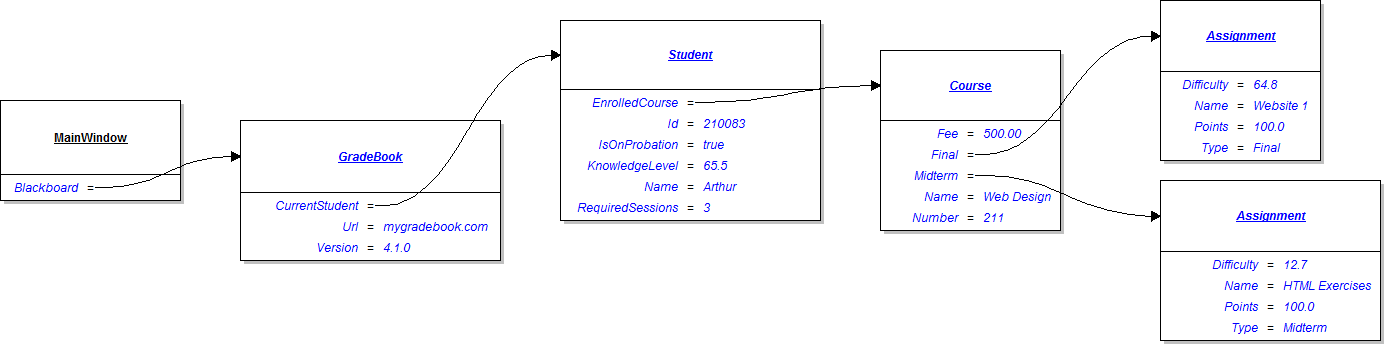
Instantiate objects and assign values to Blackboard.
Using the object diagram below, instantiate objects and assign values for the Blackboard object and its sub-objects in the
newBlackboardButton_Click
.
1.1 Grade Book 2 Object.png
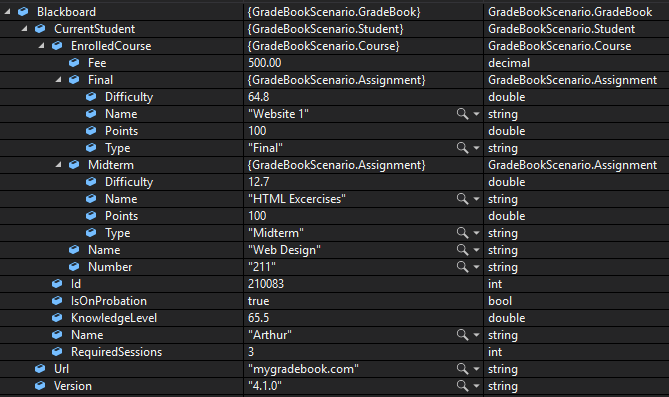
Check Your Work:
Set a breakpoint on the closing curly brace of the
newBlackboardButton_Click
.
Start the application. Click the New Blackboard button.
Ensure your values match the values below.
1.1 Grade Book 2 CYW BlackboardValues.PNG
Go to top
Submit a zipped Visual Studio solution.
Ensure all code is StyleCop compliant
Zip the solution and submit to the Feedback System.
Submit the Feedback System url to the correct assignment in Canvas.
Go to top