6.4 Scratchpad Learning Activity

Overview

6.4 Scratchpad Learning Activity

Topics covered in this assignment include: Extension methods/Anonymous types/Local variable type inference/Query expressions/Languate-Integrated Query (LINQ)

Work through the stories in order. Use the acceptance criteria to check each feature, and complete the nested tasks using the specified names, values, and scenarios.

If you like, you can follow along with the instructor-led lab video
1.If you like, you can follow along with the instructor-led lab video

6.5 Scratchpad Lab Walkthrough [47:59]

6.5 Scratchpad Lab Walkthrough [47:59]
A If you like, you can follow along with the instructor-led lab video
Extension Methods (all root steps pertain to the LinqButton1_Click event handler).
Acceptance Criteria
Acceptance criteria
  • The students variable should contain Gritz, Smith and Zastrow.
  • Press F11. Note that the debugger does not step into extension methods. The students variable should have the same students.
  • Press F10. The sum should be 82000.
  • Press F10. The sum variable should remain the same.

Instructions
2.Extension Methods (all root steps pertain to the LinqButton1_Click event handler).

Extension methods are methods defined in an additional class that are then "attached" to a class. This relates to the concept "Open for Extension/Closed for Modification" in that extension methods don't affect a class directly.

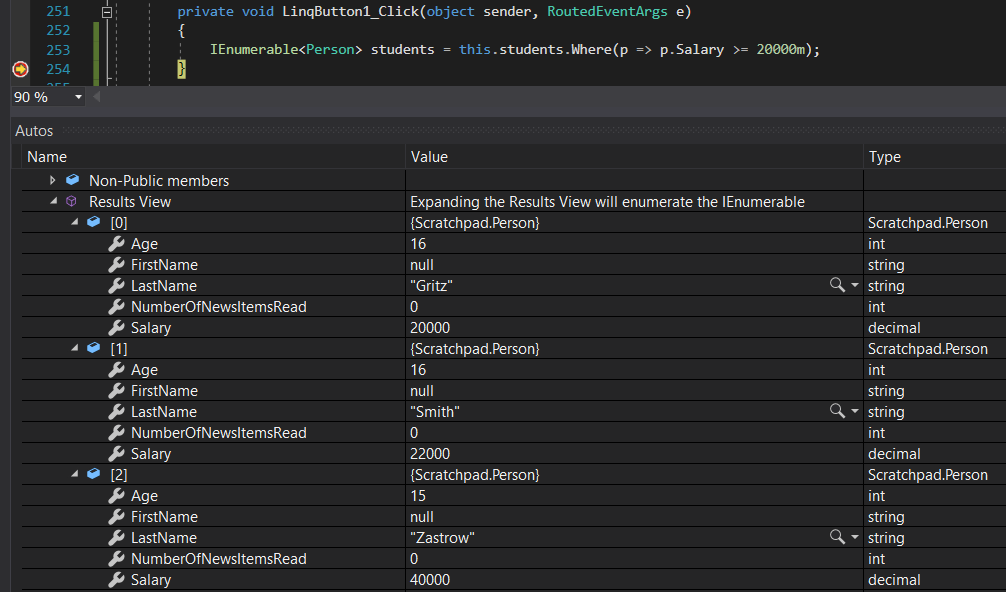
A Find all students that have a salary over 20,000
1 Paste the code below:
this.students.Where(p => p.Salary >= 20000m);

Where is an extension method under the System.LINQ namespace. You can F12 on it to see it. If you hover over Where, it will show that it is an extension method.

Snip: Where Extension for 6.4 Scratchpad Learning Activity. Use the adjacent task instructions to identify the required controls, output, or debugger values.
Snip: Where Extension
2 Assign the call to Where to an IEnumerable<Person> named students.

The Where extension method only returns a type of IEnumerable. Assigning it to a List type, for instance, would cause an error.

3 Check Your Work:

Set a breakpoint at the end of LinqButton1_Click.

Start the application and click 'Extension methods'.

The students variable should contain Gritz, Smith and Zastrow.

Snip: Students IEnumerable for 6.4 Scratchpad Learning Activity. Use the adjacent task instructions to identify the required controls, output, or debugger values.
Snip: Students IEnumerable
B Pass in a method instead of a condition.
1 In the Person class, paste the method below:
public bool IsRich()
{
return this.Salary >= 20000;
}
2 Back in the MainWindow, assign students to a Where clause and pass in the IsRich method.
students = this.students.Where(p => p.IsRich());
3 Check Your Work: Ensure that Gritz, Smith and Zastrow are the ones in the list.
C Pass in an extension method instead of a method.

The previous step just violated the Open/Closed principle. We had to change the Person class in order to give it more functionality. If someone other than you had the Person.dll, they wouldn't be able to do this. Instead, we are going to extend the class.

1 Define a new class named PersonExtensions.
2 Make the class static.
3 Cut and paste the IsRich method from the Person class to the PersonExtensions class.
4 Make the method static.
5 In the parenthesis of the IsRich method paste the following code:
this Person person

This parameter is what "attaches" this method to a class and makes it an extension method. Now only objects of type Person can use this method.

6 Change this.Salary to person.Salary.
7 Return to the MainWindow. Note that there are no compiler errors. The way we have IsRich called right now is the correct way…

Return to the MainWindow. Note that there are no compiler errors. The way we have IsRich called right now is the correct way to call an extension method.

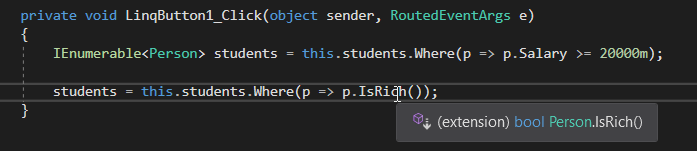
8 Hover over the call to IsRich. It should indicate that it is an extension method.
Snip: IsRich Extension for 6.4 Scratchpad Learning Activity. Use the adjacent task instructions to identify the required controls, output, or debugger values.
Snip: IsRich Extension
9 Check Your Work:

Set a breakpoint on the line that calls IsRich.

Start the application and click 'Extension methods'.

Press F11. Note that the debugger does not step into extension methods. The students variable should have the same students.

D Chain extensions methods.
1 Define a local variable of type decimal named sum and assign it to the call to the Sum extension method on the students…

Define a local variable of type decimal named sum and assign it to the call to the Sum extension method on the students IEnumerable, passing in a Func lamba for Salary.

decimal sum = students.Sum(p => p.Salary);

This is a fine way to do things, but we can change two lines to one by chaining extension methods.

2 Paste the code below:
sum = students.Where(p => p.IsRich()).Sum(p => p.Salary);
3 Check Your Work:

Set a breakpoint on the line that defines sum.

Start the application and click 'Extension methods'.

Press F10. The sum should be 82000.

Press F10. The sum variable should remain the same.
E Call the extension method the wrong way.
1 Paste the code below:
students = this.students.Where(p => PersonExtensions.IsRich(p));

This syntax should look more familiar to you. This code calls the static method and passes in the Person object. While this code works, it is just a longer version of p => p.IsRich() so we use the extension method syntax instead.

Query Syntax (all root steps pertain to the LinqButton2_Click event handler).
Acceptance Criteria
Acceptance criteria
  • Set a breakpoint on the line of code that defines result.
  • Press F11. The result vairable should have Gritz, Smith and Zastrow.
  • Press F11. The result vairable should have the same people even though the syntax is different.
  • Press F11. The linqResult vairable should have the same people.
  • Press F10. The person object should be the Fritz that makes 30,000 (the first one in the list that meets the condition).
Instructions
3.Query Syntax (all root steps pertain to the LinqButton2_Click event handler).
A Query a list using extension methods.
1 Paste the code below:
IEnumerable<Person> result = this.students.Where(p => p.IsRich()).Select(p => p);

We've seen this before, but have added the Select extension method that brings back

B Query a list using query syntax.
1 Paste the code below:
result = from p in this.students where p.IsRich() select p;

The keywords should look relatively familiar if you have taken data courses. LINQ syntax uses the same keywords, but in different order.

C Query a list using query syntax (expanded).
1 Paste the code below:
IEnumerable<Person> linqResult =
from p in this.students
where p.IsRich()
select p;

This is the same syntax as the step prior, but written in the format you will generally come across when reading/writing code. Many times there are multiple statements that can get complicated so putting them on separate lines is preferred.

2 Check Your Work:

Set a breakpoint on the line of code that defines result.

Start the application and click 'Query syntax'.

Press F11. The result vairable should have Gritz, Smith and Zastrow.

Press F11. The result vairable should have the same people even though the syntax is different.

Press F11. The linqResult vairable should have the same people.

D Use FirstOrDefault.

Many times you will see the extension method FirstOrDefault used. This extension method will grab the first object that meets the condition or a default object.

1 Add two more "Fritz" people to the students list, one with a Salary of 30,000 and one with a Salary of 40,000.
2 Paste the code below:
Person person = this.students.FirstOrDefault(p => p.LastName == "Fritz" && p.Salary > 10000);
3 Check Your Work:

Set a breakpoint on the line that defines person.

Start the application and click 'Query syntax'.

Press F10. The person object should be the Fritz that makes 30,000 (the first one in the list that meets the condition).

4 Change "Fritz" to "Halpert" in the query.
5 Check Your Work:

Run the 'Query syntax' button again. This time the object should return null.

Anonymous Types (all root steps pertain to the LinqButton3_Click event handler).
Acceptance Criteria
Acceptance criteria
  • Press F11. The result variable should be an IEnumerable<Person> with Gritz, Smith, Zastrow and Fritz in it.
  • Press F11. The result2 variable should be Gritz (they're the first person in the list that's rich).
  • Press F11. The objects in the IEnumerable should be of Type 'Anonymous Type' and have the new properites shown.
Instructions
4.Anonymous Types (all root steps pertain to the LinqButton3_Click event handler).

Anonymous types are like anonymous methods in that we define a class/type on the fly.

A Type inference.
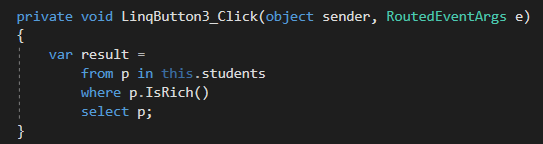
1 Paste the query below:
IEnumerable<Person> result =
from p in this.students
where p.IsRich()
select p;

This code "assumes" that the type coming back from this query is an IEnumerable<Person>. But what if it isn't??

2 Change the IEnumerable<Person> to var.
Snip: Var Type for 6.4 Scratchpad Learning Activity. Use the adjacent task instructions to identify the required controls, output, or debugger values.
Snip: Var Type
3 Hover over the result variable. The var keyword "inferred" that the return from the query is an IEnumerable<Person>.
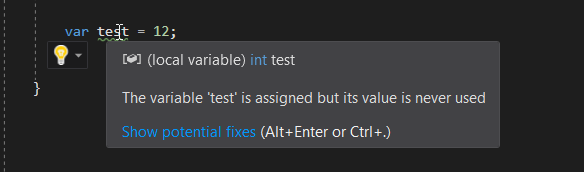
4 Define a var named test. An error occurs because the var doesn't know what type to infer.
5 Assign test to 12 and hover over test. Now that there is a value the var can accurately infer the type.
Snip: Type Inference for 6.4 Scratchpad Learning Activity. Use the adjacent task instructions to identify the required controls, output, or debugger values.
Snip: Type Inference
6 Remove the test variable.
7 Copy and paste the query and rename result to result2.
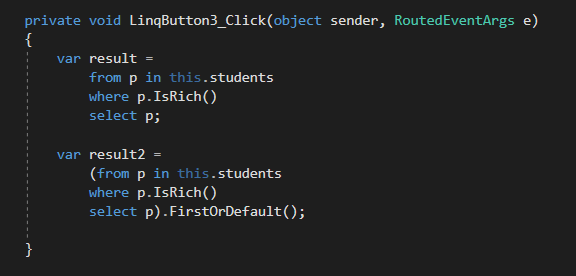
8 Surround the query syntax for result2 in parenthesis and call FirstOrDefault on the entire query.
Snip: FirstOrDefault for 6.4 Scratchpad Learning Activity. Use the adjacent task instructions to identify the required controls, output, or debugger values.
Snip: FirstOrDefault
9 Hover over the result2 variable. The type has changed from IEnumerable<Person> to just Person because the compiler now knows…

Hover over the result2 variable. The type has changed from IEnumerable<Person> to just Person because the compiler now knows that the type returned is going to be a Person object.

10 Check Your Work:

Set a breakpoint on the first query.

Start the application and click 'Anonymous types'.

Press F11. The result variable should be an IEnumerable<Person> with Gritz, Smith, Zastrow and Fritz in it.

Press F11. The result2 variable should be Gritz (they're the first person in the list that's rich).

B Anonymous type.
1 Paste the code below:
var anon = new { Name = "Steve", Number = 12345, Guy = new Person { LastName = "Fredrickson" } };

This code uses the var keyword and object intializer syntax to create an object with no "real" type. Note that we don't have a class that has the field Name or Number or Guy.

2 Hover over the anon variable. Note that the TYPE is Anonymous.
Snip: Anonymous Type for 6.4 Scratchpad Learning Activity. Use the adjacent task instructions to identify the required controls, output, or debugger values.
Snip: Anonymous Type
3 Assign the Guy property's Salary property.
anon.Guy.Salary = 10000;

Even though the anon type is anonymous, since we defined a specific type property in the initializer we can modify that object.

C Anonymous type in LINQ.
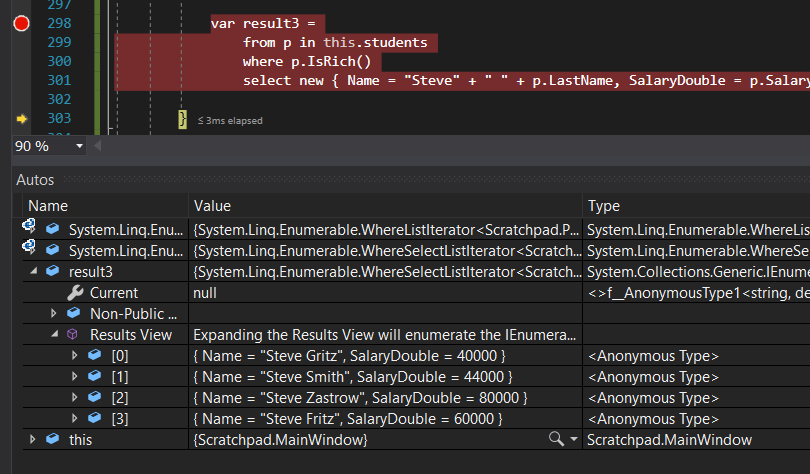
1 Copy and paste the result query and rename result to result3.

This query brings back Person objects. While that's okay we don't necessarily care about all properties and want our own custom object. More than that, selecting p (or whatever variable) is the C# equivalent of the SQL Select *; it will bring back all property data, which we may not need.

2 Replace p with an object initializer that defines an entirely new type on the fly.
new { Name = "Steve" + " " + p.LastName, SalaryDouble = p.Salary * 2 }
3 Hover over result3. Now that we have used the object initializer and the compiler has no idea what type it is, it becomes an…

Hover over result3. Now that we have used the object initializer and the compiler has no idea what type it is, it becomes an anonymous type.

4 Check Your Work:

Set a breakpoint on the line that defines result3.

Start the application and click 'Anonymous types'.

Press F11. The objects in the IEnumerable should be of Type 'Anonymous Type' and have the new properites shown.

Snip: Anonymous in Linq for 6.4 Scratchpad Learning Activity. Use the adjacent task instructions to identify the required controls, output, or debugger values.
Snip: Anonymous in Linq
Submit a zipped Visual Studio solution after completing the following:
5.Submit a zipped Visual Studio solution after completing the following:
A Ensure that the application has no compiler errors or warnings.
B Make the code StyleCop compliant.
C Remove all bin and obj folders from the entire solution.
Completion review
6.Review the feature acceptance criteria
A Confirm the required results

Return to each story and verify its acceptance criteria. Preserve the submission format and destination stated in the activity; a reading, setup guide, lab, video demonstration, and oral final may require different evidence.

Extension Methods (all root steps pertain to the LinqButton1_Click event handler). Query Syntax (all root steps pertain to the LinqButton2_Click event handler). Anonymous Types (all root steps pertain to the LinqButton3_Click event handler).