6.4B Zoo Assignment

6.4B Zoo Assignment
Use lambda expressions to attach methods to delegates
Acceptance Criteria
Acceptance criteria
  • Lambda expressions and anonymous methods replace the specified single-use delegate handlers.
1.Use lambda expressions to attach methods to delegates
Problem
Solution
A In the wallet's constructor, attach an anonymous method to the money pocket's OnBalanceChange delegate using a lambda expression, as shown in the code below.

Then remove the HandleBalanceChanged method.

Anonymous Methods
this.moneyPocket.OnBalanceChange = () =>
{
    this.OnBalanceChange?.Invoke();
};
B In the zoo's constructor, attach an anonymous method to the birthing room's OnTemperatureChange delegate using a lambda expression that does what the zoo's HandleBirthingRoomTemperatureChange method does.

Then remove the HandleBirthingRoomTemperatureChange method.

The previousTemp and currentTemp mean that those are the two parameters needed. The types of these parameters are assumed.

this.b168.OnTemperatureChange = (previousTemp, currentTemp) =>
{
    // HandleBirthingRoomTemperatureChange code goes here
};
C In the CageWindow's constructor, attach the content of the Update method to the cage's OnImageUpdate delegate using a lambda expression, as shown in the code below that does what the Update method does.

Then remove the Update method.

this.cage.OnImageUpdate = item =>
{
    // code here
};
D In the main window's and console helper's AttachDelegates methods, attach the content of the following methods to the appropriate delegates.

Then remove the unused methods.

  • HandleAnimalAdded
  • HandleAnimalRemoved
  • HandleGuestAdded
  • HandleGuestRemoved
  • HandleBirthingRoomTemperatureChanged
E Check your work
1 Run the WPF application.
2 Change the birthing room temperature. The functionality should be the same as before.
3 Add an animal and then edit it. The functionality should be the same as before.
4 Add a guest and then edit it. The functionality should be the same as before.
5 Show an animal's cage. The functionality, including moving, should be the same as before. Close the application.
6 Run the console application.
7 Change the birthing room temperature. The functionality should be the same as before.
Use a delegate to add animals to the birthing queue when they become pregnant
Acceptance Criteria
Acceptance criteria
  • Pregnancy notifications add animals to the birthing queue when they become pregnant in the zoo.
2.Use a delegate to add animals to the birthing queue when they become pregnant
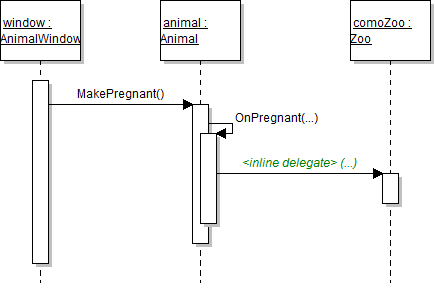
Sequence Diagram: Pregnant Delegate. Reference figure for use a delegate to add animals to the birthing queue when they become pregnant.
Sequence Diagram: Pregnant Delegate
Problem
Solution
A Add an IReproducer Action to the Animal class called OnPregnant.

It will be used to alert the zoo when an animal becomes pregnant.

B When an animal is added to the zoo, use a lambda expression to plug an anonymous method in to the animal's pregnancy delegate.

The anonymous method adds that animal to the birthing room's queue.

animal.OnPregnant = pregnantAnimal => this.b168.PregnantAnimals.Enqueue(pregnantAnimal);
animal.OnPregnant = (pregnantAnimal) =>
{
    this.b168.PregnantAnimals.Enqueue(pregnantAnimal);
};
C In the Animal class, call the OnPregnant delegate in the MakePregnant method.
D The anonymous method will only be plugged in to the delegate if an animal is added through the AddAnimal method.

Handle animals that have been added through a list initializer by plugging the same code/anonymous method in to each animal's pregnancy delegate in the zoo's OnDeserialized method (within the foreach loop).

E Check your work
1 Set a breakpoint in the anonymous method attached to the animal's pregnancy delegate on the line that adds it to the birthing room queue.

Run the WPF application.

2 Create an animal without making it pregnant.

Then edit the animal and make it pregnant. The breakpoint should be hit, which means that the method was attached to the delegate correctly.

3 Remove the breakpoint and click Continue.
4 Click the birth animal button.

The pregnant animal should give birth to a baby animal and become not pregnant. The baby animal should be added to the list box.

Use the ForEach extension method
Acceptance Criteria
Acceptance criteria
  • ForEach performs the specified operations on collection items.
3.Use the ForEach extension method

In this task, you will replace existing simple foreach loops (ones containing only a single line of code in the loop) with calls to the ForEach and ToList extension methods and lambda expressions. You will check your work by ensuring that the functionality of the WPF and console applications remain the same as before refactoring the loops.

A In the ListUtil's Flatten method, replace the foreach loop with a call to the ForEach extension method.

The ForEach method is only available on lists, so you will have to call the ToList method before calling the ForEach method.

list.ToList().ForEach(s => result += result == null ? s : separator + s);
B In the ConsoleUtil's WriteHelpDetail method with three parameters, replace the foreach loop with a call to the ToList and ForEach extension methods.
C In the CageWindow's DrawAllItems method, replace the foreach loop with a call to the ToList and ForEach extension methods.

Increment the zIndex variable when passing it in to the DrawItem method instead of after calling the method.

c => this.DrawItem(c, zIndex++)
D In the zoo's OnDeserialized method
1 Replace the foreach loop that loops through the guests with a lambda expression inside of a call to the ForEach extension method.
this.guests.ForEach(g =>
{
    this.OnAddGuest(g);
    g.GetVendingMachine += this.ProvideVendingMachine;
});

Since this foreach loop has more than one line of code in it, we need to add curly braces to signify that the code applies to all objects. Structure:

ForEach(param => { //code here });
2 Replace the foreach loop that loops through the animals with a lambda expression inside of a call to the ForEach extension method.
E In the AddAnimalsToZoo method in the Zoo class, use a ForEach extension method with curly braces to execute all code in the foreach loop.
F Check your work
1 Run the WPF application.
2 Create multiple animals of a single type, if they do not already exist.

Open their cage. All animals should still be drawn correctly, and they should not flip back and forth between the background and foreground.

3 Close the cage window.

Create two guests. Stop and restart the application. The guests should be deserialized successfully and should appear in the list box.

4 Run the console application.
5 Run the help command for the show command.

The information, including the usage and parameter details, should be written to the console as they were before the change.

Write and display results of queries
Acceptance Criteria
Acceptance criteria
  • The requested queries run and display their results.
4.Write and display results of queries

In this task, you will practice using lambda expressions and extension methods built into the .NET framework by writing queries to find specific animals and guests and finding information about all animals in the zoo. You will check your work by running the queries and ensuring that you get the correct result.

6.4.5 How to Write and Use LINQ Queries
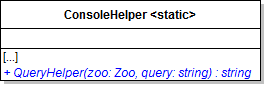
A Add a method to the ConsoleHelper called QueryHelper.
Class Diagram: QueryHelper. Reference figure for write and display results of queries.
Class Diagram: QueryHelper
B Create a new case statement called "query" on the Program's switch statement.

Inside the case statement, assign a local string variable to a call to the QueryHelper method. Pass in the zoo and the second command in the commandWords array.

C In the QueryHelper method, create a local string variable with a message stating that something went wrong.

Then add a switch statement that switches on the query parameter.

D Write queries that return a single number.
1 Define cases for "totalanimalweight", "averageanimalweight", and "animalcount".
2 For the total animal weight command, find the sum of the animals' weight by using the Sum extension method.

Do not use the TotalAnimalWeight property.

result = zoo.Animals.ToList().Sum(a => a.Weight).ToString();
3 For the average animal weight command, find the average of the animals' weight by using the Average extension method.

Do not use the AverageAnimalWeight property.

4 For the animal count, find the number of animals by using the Count extension method.

Do not use the AnimalCount property.

E Write queries that return an "object".
1 Define cases for "firstheavyanimal", "firstyoungguest", and "firstfemaledingo".
2 To find the first heavy animal, first create a local list variable for animals.

Then, use the FindAnimal method to find the first animal whose weight is over 200 pounds and add that animal to the list. Then, use the ForEach extension method to set the resulting animal the local string variable.

3 To find the first young guest, first create a local list variable for guests.

Then find the first guest who is 10 years old or younger and add that guest to the list. Use the ForEach extension method to set the resulting guest to the local string variable.

4 To find the first female dingo, first create a local list variable for animals.

Then find the first animal who is both a dingo and is female and add that animal to the list. Use the ForEach extension method to set the resulting animal the local string variable.

F Check your work
1 Run the Console application.
2 Find the total animal weight by typing into the console "query totalanimalweight". The result should be 2687.95.
3 Find the average animal weight by typing in "query averageanimalweight". The result should be 127.9976...
4 Find the animal count by typing in "query animalcount". The result should be 21.
5 Find the first heavy animal by typing in "query firstheavyanimal".

A representation of an ostrich named Stretch should appear in the data grid.

6 Find the first young guest by typing in query "firstyoungguest".

A representation of Darla who is under 10 should appear in the data grid.

7 Find the first female dingo by typing "query firstfemaledingo".

A representation of the dingo named Maggie should appear in the data grid.

Demonstrate your work
5.Record a video showing
A Your WPF Application
1 Show that editing an animal's fields still updates their information like before
2 Show that editing a guest's fields still updates their information like before
3 Show a cage with multiple animals. Animals should move and grow tired normally like before.
B Places where extension methods are used
1 The Zoo class
Subtasks
  • A. OnDeserialized method
  • B. AddAnimalsToZoo method
2 ConsoleHelper class
Subtasks
  • A. QueryHelper method
Prepare and submit your work
6.Submission Steps
A Ensure that your application has no compiler errors or warnings
B Ensure that your code is StyleCop compliant
C Remove all bin and obj folders from your solution
D Zip your solution
E Submit your zipped solution to the Feedback System
F Submit your Feedback System results link to Canvas
G Submit your video recording to your f-channel
Source credit

© 2026 Northcentral Technical College