6.4A Zoo Assignment

6.4A Zoo Assignment
Allow sorting animals by age.
Acceptance Criteria
Acceptance criteria
  • Comparison delegates allow animals to be sorted by age as well as the existing values.
1.Allow sorting animals by age.
Problem
Solution
A Add the following code to the zoo constructor so there are animals and guests to sort.

Make sure the zoo only starts with these animals and guests.

// Animals for sorting
this.AddAnimal(new Chimpanzee("Bobo", 10, 128.2, Gender.Male));
this.AddAnimal(new Chimpanzee("Bubbles", 3, 103.8, Gender.Female));
this.AddAnimal(new Dingo("Spot", 5, 41.3, Gender.Male));
this.AddAnimal(new Dingo("Maggie", 6, 37.2, Gender.Female));
this.AddAnimal(new Dingo("Toby", 0, 15.0, Gender.Male));
this.AddAnimal(new Eagle("Ari", 12, 10.1, Gender.Female));
this.AddAnimal(new Hummingbird("Buzz", 2, 0.02, Gender.Male));
this.AddAnimal(new Hummingbird("Bitsy", 1, 0.03, Gender.Female));
this.AddAnimal(new Kangaroo("Kanga", 8, 72.0, Gender.Female));
this.AddAnimal(new Kangaroo("Roo", 0, 23.9, Gender.Male));
this.AddAnimal(new Kangaroo("Jake", 9, 153.5, Gender.Male));
this.AddAnimal(new Ostrich("Stretch", 26, 231.7, Gender.Male));
this.AddAnimal(new Ostrich("Speedy", 30, 213.0, Gender.Female));
this.AddAnimal(new Platypus("Patti", 13, 4.4, Gender.Female));
this.AddAnimal(new Platypus("Bill", 11, 4.9, Gender.Male));
this.AddAnimal(new Platypus("Ted", 0, 1.1, Gender.Male));
this.AddAnimal(new Shark("Bruce", 19, 810.6, Gender.Female));
this.AddAnimal(new Shark("Anchor", 17, 458.0, Gender.Male));
this.AddAnimal(new Shark("Chum", 14, 377.3, Gender.Male));
this.AddAnimal(new Squirrel("Chip", 4, 1.0, Gender.Male));
this.AddAnimal(new Squirrel("Dale", 4, 0.9, Gender.Male));

// Guests for sorting
this.AddGuest(new Guest("Greg", 35, 100.0m, WalletColor.Crimson, Gender.Male, new Account()), new Ticket(0m, 0, 0));
this.AddGuest(new Guest("Darla", 7, 10.0m, WalletColor.Brown, Gender.Female, new Account()), new Ticket(0m, 0, 0));
this.AddGuest(new Guest("Anna", 8, 12.56m, WalletColor.Brown, Gender.Female, new Account()), new Ticket(0m, 0, 0));
this.AddGuest(new Guest("Matthew", 42, 10.0m, WalletColor.Brown, Gender.Male, new Account()), new Ticket(0m, 0, 0));
this.AddGuest(new Guest("Doug", 7, 11.10m, WalletColor.Brown, Gender.Male, new Account()), new Ticket(0m, 0, 0));
this.AddGuest(new Guest("Jared", 17, 31.70m, WalletColor.Brown, Gender.Male, new Account()), new Ticket(0m, 0, 0));
this.AddGuest(new Guest("Sean", 34, 20.50m, WalletColor.Brown, Gender.Male, new Account()), new Ticket(0m, 0, 0));
this.AddGuest(new Guest("Sally", 52, 134.20m, WalletColor.Brown, Gender.Female, new Account()), new Ticket(0m, 0, 0));
B Set up the console for age sorting by both animals and guests.

Currently when we sort we are always calling the animal sort, but now that we have guests to sort we will have to add another parameter to test against. We will be implementing it later on.

1 In the sort case in the Program class, create an if-statement that compares commandWords[1] to "animals".
2 Cut and paste the call to SortAnimals into the body of the if statement.
3 Define a sortResult variable before the if statement to hold a SortResult object. Assign it to null.
4 Move the foreach loop that writes all the animals to the Console to inside the if statement.
5 Add an additional description for VALUE.

Change the index arguments based on the structure: "sort animals bubble weight". The result should look like the following when it is written to the console:

SORT TYPE: BUBBLE
SORT BY: ANIMALS
SORT VALUE: WEIGHT
SWAP COUNT: 108
COMPARE COUNT: 210
C Write methods comparing two animals.
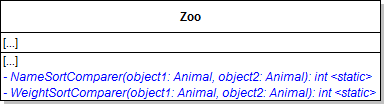
1 Make changes to the Zoo class as specified in the diagram below.
Class Diagram: Compare Methods. Reference figure for allow sorting animals by age.
Class Diagram: Compare Methods
2 In the NameSortComparer method, return the result of calling the string.Compare method.

Pass in the names of the two animals.

3 In the WeightSortComparer, use the list below to determine the value to return.
  • weights are equal: return 0
  • object1 weight is greater than object2 weight: return 1
  • object2 weight is greater than object1 weight: return -1
double weight1 = animal1.Weight;
double weight2 = animal2.Weight;

return weight1 == weight2 ? 0 : weight1 > weight2 ? 1 : -1;
D Modify the zoo's SortAnimals method.
1 At the beginning of the method, define a variable of type Func<Animal, Animal, int> named compareFunc.

If the sortValue is "name", set the variable to the NameSortComparer method. Otherwise, set the variable to the WeightSortComparer method.

2 In each case statement, remove the if/else statement and the type specific sort call and pass in the func variable for the comparer parameter.
E Modify the SortHelper class.

The difference between each pair of Sort methods is what to compare (either weight or name) and how to compare them (either using the string compare method for names or the comparison operators for weight). The methods' algorithms are identical otherwise. Now that we have moved the logic of what to compare and how to compare them into their own methods (the Name and Weight sort comparer methods), we can reduce each pair of Sort algorithms to 1 and take in a comparing method as a parameter. This allows us to abide by DRY while still sorting by different values! It also allows us to easily make new ways to compare things while still using the same Sorting algorithms!

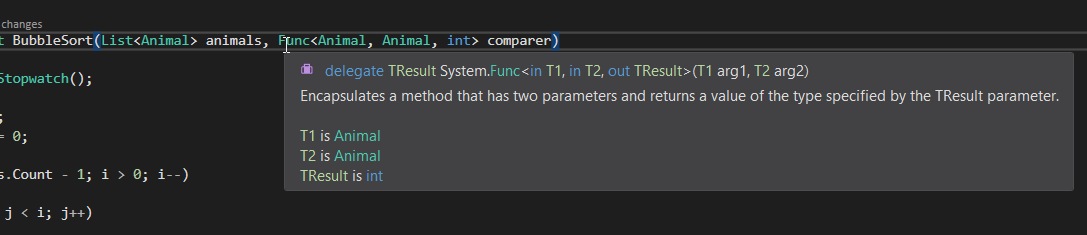
Class Diagram: Sort Methods with Funcs. Reference figure for allow sorting animals by age.
Class Diagram: Sort Methods with Funcs
1 For each pair of sort methods
Subtasks
  • A. Choose one of the two methods of the sorting type (bubble, insertion, etc) and use CTRL+R+R to rename it to the name in the class diagram.
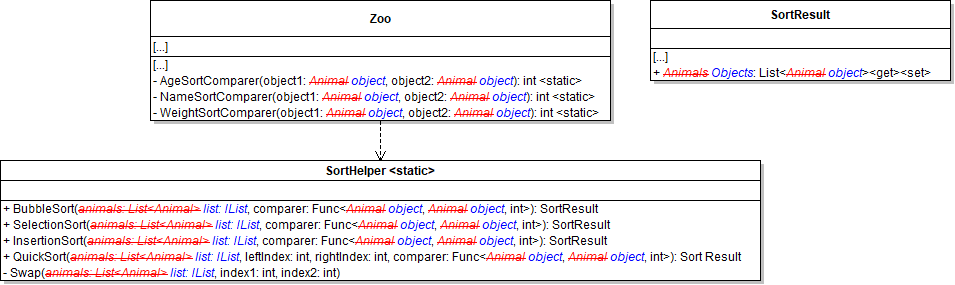
  • B. Add the Func parameter as shown in the class diagram.
Snip: Func Parameter. Reference figure for allow sorting animals by age.
Snip: Func Parameter
Subtasks
  • C. In each sort method, whenever a comparison between animals occurs, instead call the comparer delegate and pass in the two animals. For example, the comparison in the bubble sort becomes the following:
if (comparer(animals[j], animals[j + 1]) > 0)
{
    // swap code and swapCounter
}
Subtasks
  • D. Remove the other Sort method for that type.
F Within the Zoo class, create an AgeSortComparer modeled after the WeightSortCompare method.
G In the Zoo's SortAnimal method, add a condition for using the AgeSortComparer.
H Check your work
1 Run the console application.
2 Sort animals by name and by weight using each sort type.

The command should be modeled after "sort animals bubble weight". Ensure that the animals are sorted correctly each time.

3 Sort animals by age using each type.

Ensure that the animals are sorted correctly each time. Restart the zoo between sorts for better results.

Allow sorting of guests.
Acceptance Criteria
Acceptance criteria
  • The sorting methods support guests through the generalized object collection.
2.Allow sorting of guests.
Problem
Solution
A Add an else-if in the search command comparing the second parameter in the commandWords array to "guests".

Leave it empty for now.

B Make changes to the Zoo and SortHelper classes as specified in the diagram below.

These changes - changing animals to objects - will make the sort methods generic so that they can be used to sort any collection of objects that supports the IList interface.
  • There is a difference between 'Object' and 'object'. Make sure when changing the types that you are using the 'object' type.
  • There will be build errors that we will fix in later steps.
  • Rely heavily on CTRL+R+R to rename things.
  • You will need to add a using System.Collection to use the IList interface.
Class Diagram: Generic Methods. Reference figure for allow sorting of guests.
Class Diagram: Generic Methods
C In the Zoo's existing Comparer methods, cast the objects to an Animal type.
D Rename the NameSortComparer to AnimalNameSortComparer and update references to it.
E In the SortAnimals method, change the compareFunc variable to be of type Func<object, object, int>
F Within the Zoo class, create a GuestNameSortComparer method and model it after the existing NameSortComparer method.
G Create a MoneyBalanceSortComparer method modeled after the WeightSortComparer.

Have the method accept two objects and compare the sum of their Wallet and CheckingAccount money balances.

H In the Sort methods, you will have to cast the resulting SortResult's object initializer on the Objects property in order to get the code to compile.

To do so, set the Objects to the code below:

6.4.1 How to Use Extension Methods
list.Cast<object>().ToList()
I In the Zoo class, rename the SortAnimals method to be SortObjects. In the method
1 Add a parameter named list of type IList.
2 Use this list within the method instead of the zoo's animals.
3 When calling QuickSort, pass in the count of the list parameter - 1 instead of the count of the zoo's animals.
J Create new SortAnimals and SortGuests methods in the Zoo class.

Within these methods call the SortObjects method and pass in the appropriate list from the zoo.

K Within the SortObjects method, ensure there are conditions for the sortValue of: animalname, guestname, animalage, animalweight, and moneybalance.

Use them to assign the correct sort comparer.

L In the "sort" case in the Program class
1 Call SortAnimals or SortGuests depending on commandWords[1].
2 Add a foreach loop that writes the guests like how animals are written to the console.

M. Modify the binary search:

3 In the call to SortAnimals, change the "name" argument to "animalname"
4 After the call to SortAnimals, define a new variable of type List<Animal> and assign it to the sortResult's Objects property.
5 Modify the code to target this list directly.
M Update the warning that appears when the user doesn't type the sort command correctly to include what the sorting is sorted by, the sort value and the new search parameters.
N Check your work
1 Run the console application.
2 Run each sort type for name and money balance and ensure that the guests are sorted correctly.

Use "sort guests selection guestName" as a template.
Use predicates to find an animal, guest, or employee
Acceptance Criteria
Acceptance criteria
  • Predicate parameters allow the find operations to use different matching conditions.
3.Use predicates to find an animal, guest, or employee
Problem
Solution
6.4.2 How to Use Predicates
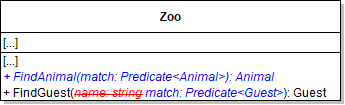
A Make changes to the Zoo class as specified in the diagram below.
Class Diagram: Find Predicates. Reference figure for use predicates to find an animal, guest, or employee.
Class Diagram: Find Predicates
B In the FindAnimal and FindGuest methods, return the result of calling the Find extension method on the appropriate list.

Pass the match Predicate parameter through.

C For each call to FindAnimal and FindGuest pass in a lambda expression that specifies a condition for which object to find.

For example, if you want to find an animal with a specified name, your lambda expression might look like the code below:

6.4.3 How to Use Lambda Expressions
Animal animal = zoo.FindAnimal(a => a.Name == name);
D Implement auto-adoption for animal.
1 Update the MainWindow's adoptAnimalButton_Click event handler to pass a predicate into the FindGuest method rather than using a selected guest.
2 The predicate should identify a guest without an adopted animal.
3 Break out the if statement that checks if the animal and guest exist.
Subtasks
  • A. If the animal exists, find the cage. If it doesn't, show a message that the user must select an animal to adopt.
  • B. If the animal exists, check is the guest exists. If they do, have the guest adopt the animal and then add the guest to the cage. If they don't, show a message to the user that there are not guests available to adopt the animal.
E Check your work
1 Run the console application.
2 Create an animal.

Then show that animal (the show command uses the FindAnimal method). Both commands should work as before.

3 Create a guest.

Then show that guest (the show command uses the FindGuest method). Both commands should work as before.

4 Close the console application.

Open the WPF application, select an animal, then click the adopt button. The first guest without an adopted animal in the list should adopt that animal. Show the cage to make sure the guest and the animals are all drawn.

5 Have all guests adopt animals if they can and then click the Adopt Animal button again.

Ensure you get a message about no available guests.

Demonstrate your work
4.Record a video showing
A Your Console Application
1 Show that guests can be sorted correctly by name and money balance.

Use a different sorting algorithm each time you sort.

2 Show that animals can be sorted correctly by name, age, and weight.

Use a different sorting algorithm each time you sort.

B Your WPF Application
1 Show that the Adopt Animal button causes the selected animal to be adopted by the first guest without an adopted animal.
2 Show that the Adopt Animal button displays an error message box if no more guests can adopt an animal.
Prepare and submit your work
5.Submission Steps
A Ensure that your application has no compiler errors or warnings
B Ensure that your code is StyleCop compliant
C Remove all bin and obj folders from your solution
D Zip your solution
E Submit your zipped solution to the Feedback System
F Submit your Feedback System results link to Canvas
G Submit your video recording to your f-channel
Source credit

© 2026 Northcentral Technical College